Discover how trackable qr codes turn offline interactions into measurable data, helping you optimize campaigns and prove ROI with real-time scan insights.
Imagine running a flyer campaign and knowing exactly how many people scanned it, when they did, and even where they were. That's the magic of a trackable QR code. They turn static, offline marketing materials into dynamic, data-rich tools that show you exactly what's working.
What Are Trackable QR Codes and Why Do They Matter?
At its heart, a trackable QR code—often called a dynamic QR code—is much more than a simple link to a website. Think of it as a smart gateway. It logs valuable data about the scan before sending the user to their final destination. This tiny detour is what separates a basic, one-trick code from a powerful marketing instrument.
A standard, static QR code permanently embeds a single web address right into the pattern. A trackable code, however, contains a special, short URL that you control. This intermediary link is the secret sauce; it’s what lets you gather analytics and even change where the code points later on, all without ever reprinting a thing.
The Bridge Between Your Physical and Digital Marketing
For small business owners, marketers, and event coordinators, this is a game-changer. It finally connects the dots between what you do in the real world and the results you see online. For years, measuring the direct impact of a printed poster, a restaurant table tent, or a business card was pure guesswork. Trackable QR codes change that completely.
Now, you can finally get real answers to critical business questions:
- Which flyer design gets more scans? Run an A/B test with two different codes and let the data tell you what your audience prefers.
- When are customers most engaged with our in-store display? Analytics will show you the peak scan times, helping you fine-tune your promotions.
- How many people from our direct mail campaign actually visited our landing page? You can directly tie website traffic back to specific print materials.
A trackable QR code gives you the same kind of data for your print campaigns that you expect from your digital ads. It’s about making every piece of marketing accountable and measurable.
Why This Matters for Your Business
This ability to collect real-world data is what makes these codes so valuable. For a restaurant owner, it means understanding which menu specials are actually grabbing diners' attention. For a retailer, it’s about proving the ROI of that expensive window display. For an event planner, it’s gauging real-time engagement at different booths or sessions.
Ultimately, trackable QR codes let you make smarter, data-driven decisions. Instead of guessing what works, you’ll have clear insights into your customers' behavior. That lets you refine your strategies, improve customer experiences, and get the most out of every dollar in your marketing budget. Platforms like QR Code Maker make creating and managing these powerful codes simple enough for any business to get started.
How Trackable QR Codes Work Behind the Scenes
Ever wondered what makes a QR code "trackable"? The magic isn't in the code itself, but in a clever bit of digital plumbing that happens in the blink of an eye. Think of a trackable QR code not as a direct flight to your website, but as a flight with a brief, intelligent layover.
That layover is managed by a platform like QR Code Maker. Instead of encoding your final destination (like yourcompany.com) directly into the code, a trackable QR code contains a special short URL that acts as an intermediary.
When a customer scans your code, their phone first visits this short URL. In that split second, the platform acts like a digital receptionist. It logs crucial data—the time of the scan, the device type, and the geographic location—before instantly redirecting the user to your final destination. This quick, invisible redirect is the secret to unlocking all your analytics.
The Power of the Redirect
This redirection mechanism is what fundamentally separates a simple static code from a powerful trackable one. Because the code itself always points to that short URL controlled by your QR code platform, you gain two huge advantages.
First, you can finally gather real performance data on your print materials. Second, and this is a big one, you can change the final destination link at any time without having to reprint anything. That QR code on a thousand flyers can be updated from your dashboard in seconds. You can learn more about the fundamental technology in our guide on how QR codes work.
The process looks something like this, turning a simple scan into a valuable data point for your marketing.
This flow shows how trackable codes bridge the gap, connecting your offline marketing efforts directly to your online analytics dashboard.
Static vs. Trackable QR Codes: A Quick Comparison
To really appreciate the value here, it helps to see the two types of codes side-by-side. One is a fixed tool; the other is a flexible marketing asset that grows with your business.
This table highlights the key differences, helping you choose the right type for your business goals.
| Feature | Static QR Codes | Trackable (Dynamic) QR Codes |
|---|---|---|
| Destination Link | Permanent and unchangeable. | Editable. You can update the link anytime. |
| Analytics | None. You cannot track scans or user data. | Comprehensive. Tracks scans, location, time, and device. |
| Use Case | Best for permanent information like WiFi passwords. | Ideal for marketing campaigns, menus, and promotions. |
| Cost & Flexibility | Free but rigid. A mistake requires reprinting. | Subscription-based, offering high flexibility and ROI. |
So, which one should you use? It really depends on your goal. If you need to share information that will absolutely never change—like a Wi-Fi password or your company’s mailing address—a static code works just fine.
But for any marketing or business purpose where you want to measure results, gather insights, or maintain flexibility, trackable QR codes are the professional standard. This smart redirection is what allows small businesses to finally measure the effectiveness of their print advertising, optimize customer experiences, and adapt their strategies based on real-world engagement.
Practical Benefits: What QR Code Tracking Can Do For You
Knowing the tech behind trackable QR codes is one thing, but the real value is in what it can do for your business. This isn't about collecting numbers for a spreadsheet; it's about turning those numbers into smarter marketing, better customer experiences, and a healthier bottom line.
Think of trackable QR codes as a digital pulse for your physical marketing. For the first time, you can see exactly how your offline efforts are performing, giving you a level of clarity that used to be impossible.
Finally Measure Offline Marketing ROI
One of the oldest headaches for business owners is proving the return on investment (ROI) for print advertising. How do you know if that pricey magazine ad or the stack of flyers you handed out actually brought people to your website or store? Trackable QR codes create that direct, measurable link.
By putting a unique trackable code on each marketing piece, you can tie website visits, coupon redemptions, or sales directly back to that specific source.
- Direct Mail Campaign: See exactly how many people scanned the code on your postcard and hit your landing page.
- In-Store Signage: Track scans on a product display to measure how many shoppers engaged with a new item or special offer.
- Event Banners: Know precisely how much web traffic came from your booth at that local trade show.
This direct attribution lets you calculate a clear ROI, helping you decide where to put your marketing budget for the best results. No more guessing.
Gain Invaluable Customer Insights
Beyond just counting scans, trackable QR codes tell you a story about your audience. The analytics dashboard in a platform like QR Code Maker is a goldmine of information, showing you who is engaging with your brand, where they are, and when they’re most active.
This data helps you build a much sharper picture of your customers. For instance, if you're a restaurant owner and notice that scans on your table tents spike between 4 PM and 5 PM, you could launch a happy hour promotion aimed squarely at that time slot. Or if analytics show most of your scans are coming from a neighboring town, maybe it's time for a localized ad campaign there.
Tracking data turns your audience from an anonymous crowd into individuals with observable behaviors. It helps you understand their journey and meet them where they are.
Enable A/B Testing for Print Materials
Digital marketers use A/B testing to optimize everything from email subject lines to ad copy. With trackable QR codes, you can finally bring this powerful technique to your print materials. Want to know which headline on your flyer works better? Or which call-to-action drives more scans?
It’s surprisingly simple:
- Create two versions of your print material (Version A and Version B).
- Generate a separate trackable QR code for each version.
- Distribute both versions to similar audiences.
- Watch your analytics to see which code gets more scans.
The results give you hard evidence of what resonates with your audience, taking the guesswork out of design. This creates a feedback loop for continuous improvement, making your print campaigns more effective over time.
Real-World Examples: Trackable QR Codes in Action
Theory is one thing, but seeing how trackable QR codes solve real problems is where their value clicks. This technology is incredibly flexible, offering smart solutions for just about any business. Let's look at a playbook of proven, practical ways to use them.
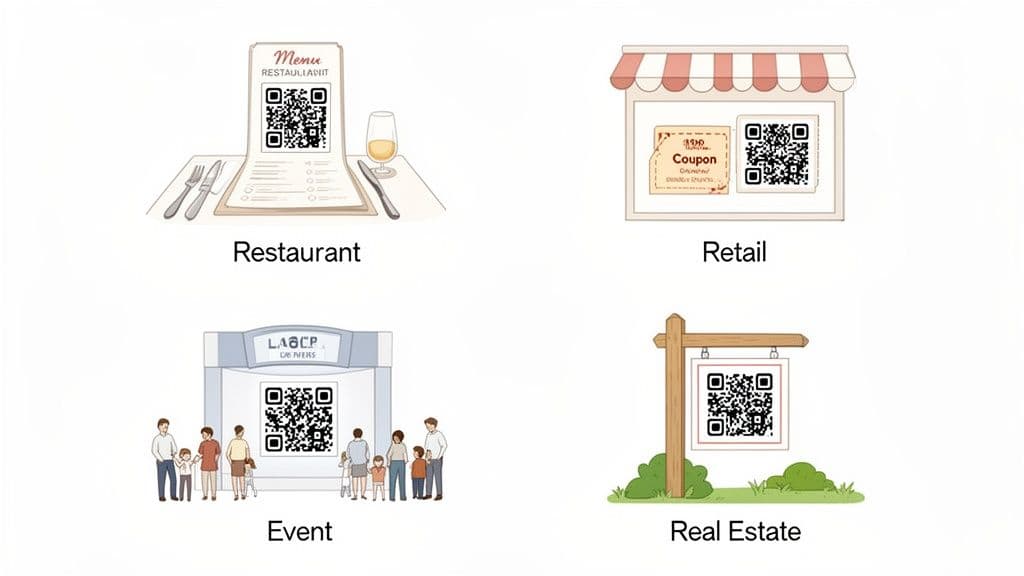
Remember, the goal isn't just to use a QR code. It's to use it strategically to gather data and improve your business. Every scan is a conversation with a customer, and with the right tools, you can learn something valuable from every single one.
Optimizing the Dining Experience in Restaurants
For restaurant owners, a QR code is way more than a paper menu replacement. A dynamic QR code on each table can become a powerful tool for understanding diner habits and making operations smoother.
- Use Case: A restaurant places a trackable QR code on every table tent that links to their digital menu.
- Insight: By tracking the scans, the manager sees that scan activity peaks at 7 PM on Fridays and Saturdays. They also notice that scans for the cocktail menu are highest between 5-6 PM daily.
- Action: They adjust staffing to handle the weekend rush more effectively and create a happy hour promotion from 5-6 PM, featuring discounted cocktails to capitalize on proven customer interest.
A trusted platform like QR Code Maker even lets you create specialized restaurant menu QR codes that can host beautiful digital menus and make managing them a breeze.
Driving Sales and Engagement in Retail
QR codes are the perfect bridge between a physical store and an online presence, improving the customer journey while providing clear marketing metrics. With QR code adoption trends and their impact showing massive growth, it's clear this is a core strategy for modern retail.
- Use Case: A clothing boutique puts a QR code on a window display for a new collection, linking to the online store.
- Insight: Analytics show dozens of scans occurring after the store closes, between 8 PM and 11 PM.
- Action: The owner creates a special "After Hours" discount code that is only displayed when the QR code is scanned after 8 PM, turning window shoppers into online customers.
Measuring Success at Events
For event organizers, success is all about attendee engagement. Trackable QR codes provide a simple way to measure that engagement in real time.
Trackable QR codes allow event planners to measure foot traffic and content engagement with the same precision as a website analytics tool.
- Use Case: An event organizer places a unique QR code at the exit of each presentation room, linking to a quick feedback form.
- Insight: The data reveals that one particular speaker's session had the highest scan rate for feedback forms, and the comments were overwhelmingly positive.
- Action: The organizer invites that popular speaker back for next year's keynote address, confident they are delivering content the audience loves.
Generating Leads in Real Estate
In the competitive real estate market, every lead matters. Trackable QR codes on "For Sale" signs and flyers can turn a casual glance into an active lead.
- Use Case: A real estate agent places a trackable QR code on a yard sign that links to a virtual tour of the property.
- Insight: Scan data shows which properties are getting the most curbside attention, even before a formal showing is requested.
- Action: The agent can proactively follow up on inquiries for the most-scanned properties and use the data to advise sellers on which homes are generating the most buzz.
Your Step-by-Step Guide to Creating a Trackable QR Code
Ready to get started? Creating your first trackable QR code is surprisingly simple. We’ll walk through the process using a professional tool like QR Code Maker, which is built for business owners, not developers. The core steps are the same across any quality platform.
Step 1: Choose Your QR Code's Purpose
First, decide what you want to happen when someone scans your code. Are you sending them to your website, a PDF menu, your business card, or a special offer? Each destination works best with a specific QR code type.
Common choices include:
- Website URL: Perfect for sending traffic to a landing page, your online store, or a new blog post.
- vCard: A digital business card. Lets people instantly save your contact info to their phone.
- PDF: A great way to share menus, detailed brochures, or event guides without printing costs.
- WiFi: Allows customers to connect to your guest network with a single scan—no more typing out long passwords.
Step 2: Enter Your Content and Select "Dynamic"
Once you've picked the type, you'll add your destination link or content. This is also where you make the single most important choice for tracking.
You'll see an option for a static vs. a dynamic QR code. Always choose dynamic. This is the magic switch that makes your code trackable and editable. When you select "dynamic," you're telling the platform to generate that special short URL that logs analytics before redirecting the user.
Step 3: Customize Your QR Code to Boost Scans
A standard black-and-white QR code works, but a branded one works better. Customizing your code with your logo and colors builds trust and looks more professional, which encourages people to scan it.
A good QR code generator will let you:
- Add Your Logo: Placing your logo in the middle instantly tells users who the code belongs to.
- Use Brand Colors: Ditch the generic black and switch to your brand's color palette.
- Include a Frame & CTA: Add a simple frame with a clear call-to-action (CTA) like "Scan for Menu" or "Get 20% Off."
A visually appealing, branded code can significantly increase your scan rates because it feels intentional and trustworthy. Even a simple tool like a WhatsApp QR Code Generator can help you practice the basics of creation.
Step 4: Download in the Right High-Quality Format
Once you're happy with the design, it's time to download the image file. Professional platforms will offer high-quality options suitable for different uses.
- PNG: Best for digital use cases like websites, emails, and social media posts. It supports transparent backgrounds.
- SVG: The gold standard for print. It’s a vector file, meaning you can scale it to any size—from a business card to a billboard—and it will stay perfectly sharp.
Best Practice Tip: If your QR code will be printed, always download it as an SVG file. This guarantees it will be crisp and scannable, no matter the size.
Once downloaded, your trackable QR code is ready for action. Just make sure you place it where people will see it, and always include a short, clear instruction telling them why they should scan it. For more details, check out our full guide on how to create a QR code.
How to Turn QR Code Analytics into Actionable Insights
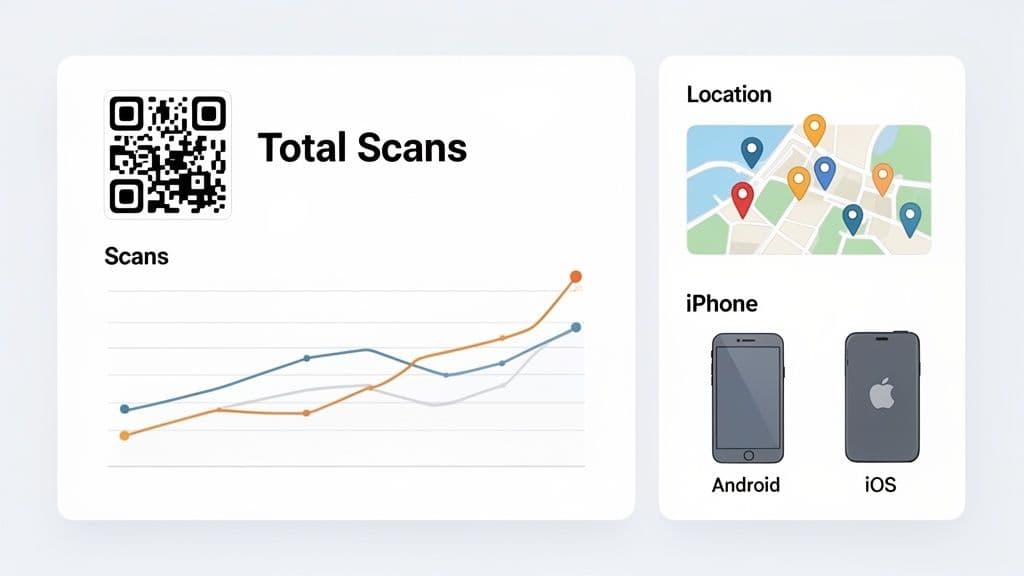
Collecting data is just the first step. The real value comes from turning those numbers into smarter business decisions. Your analytics dashboard isn't just a list of stats—it tells a story about your customers. Learning to read that story helps you spot trends and optimize your strategy.
Think of your analytics dashboard as the control panel for your offline marketing. It gives you a clear, real-time view of how your campaigns are performing, letting you get a much better return on your efforts.
From Data Points to Decisions
So, what should you look for? Platforms like QR Code Maker provide a dashboard with several key metrics. Each one is a clue about your customers' behavior.
Here’s a breakdown of the core metrics and how to act on them:
-
Total Scans vs. Unique Scans: Total scans measure overall engagement, but unique scans tell you how many individual people scanned your code. A high number of total scans per unique user could mean people are returning to your content—great for a restaurant menu, but may signal confusion if it's for a one-time offer.
-
Scan Location: This metric shows you where your audience is. Imagine you run an e-commerce store and notice a surprising number of scans coming from a nearby city where you don't have a physical presence. That's a perfect signal to run a targeted social media ad campaign for that specific area.
-
Time of Day: Knowing when people scan your codes helps you optimize your timing. A coffee shop might see scans on a sidewalk sign peak between 7 AM and 9 AM. With that data, they could schedule a "morning rush" promotion to appear only when someone scans the code during those hours.
-
Device Type: This shows whether your audience uses primarily iPhones (iOS) or Android devices. If 80% of your scans come from Android users, you should test your landing page on Chrome to ensure it loads perfectly for the majority of your visitors.
The goal is to move from "what happened" to "what's next." Every data point is a prompt for a strategic action that can improve your marketing.
The insights you gather are a huge piece of the puzzle, feeding directly into your overall user retention metrics. By continuously watching this data, you can make small, informed adjustments that lead to big improvements over time. This cycle of scanning, analyzing, and acting is what separates successful campaigns from static ones. Check out our guide to learn more about how to track QR code scans and get the most from your analytics.
Common Questions About Trackable QR Codes
As you start using trackable QR codes, a few key questions often come up. Getting these sorted out will help you choose the right tools and move forward with confidence.
What Happens If I Stop Paying for My Service?
This is a critical question, and the answer depends on the provider. It's something you should absolutely check before committing.
With a service like QR Code Maker, your dynamic codes will keep working—they'll continue sending people to their destination. What you lose is access to the analytics dashboard and the ability to edit the link. Some other providers, however, will simply deactivate your codes entirely, turning your printed materials into dead ends. Always read the fine print on this.
Can I Make an Existing Static QR Code Trackable?
Unfortunately, no. A static QR code has its final destination URL permanently encoded into the pattern itself. To get the benefits of tracking and editing, you must create a new QR code and choose the dynamic or trackable option from the start.
Is There a Limit on Scans?
For most professional QR code services, including QR Code Maker, there is no limit to how many times your code can be scanned. Your customers can engage with it over and over again without issue. However, be aware that some free plans or limited trials from other platforms might impose scan limits. Always double-check the features included in your specific plan.
Ready to create QR codes that deliver real, measurable results? With QR Code Maker, you can generate, customize, and track dynamic QR codes in minutes. Start your free trial today and see what your campaigns can really do.
Frequently Asked Questions
What is a trackable QR code?
A trackable QR code, or dynamic QR code, is a type of QR code that allows businesses to gather analytics about scans, including time, location, and device type.
How do I create a trackable QR code?
You can create a trackable QR code using platforms like QR Code Maker, which provide tools to generate and manage these codes easily.
Can I change the link of a trackable QR code after it's printed?
Yes, one of the key benefits of trackable QR codes is that you can update the destination link at any time without needing to reprint the code.
What types of businesses can benefit from trackable QR codes?
Any business that uses print marketing materials, such as restaurants, retailers, and event planners, can benefit from trackable QR codes to measure engagement and optimize strategies.
How can I measure the effectiveness of my print campaigns with QR codes?
By placing unique trackable QR codes on different print materials, you can monitor scans and link them directly to website visits or sales, providing clear metrics for ROI.
Ready to create your QR code?
Free forever for static codes. Pro features with 14-day trial, no credit card required.
Irina
·Content LeadIrina leads content strategy at QR Code Maker, helping businesses understand how to leverage QR codes for marketing, operations, and customer engagement. Her expertise spans digital marketing, user experience, and practical implementation guides.
Learn more about us →Related Articles
What Are Dynamic QR Codes And How Do They Work?
Discover how dynamic QR codes work, offering editable links and detailed scan tracking to elevate your marketing campaigns and save on reprinting costs.
Your Guide to Creating QR Codes That Drive Results
Discover how a trackable QR code generator can transform your marketing with real-time analytics. Learn to create, manage, and measure dynamic QR codes.
10 Essential QR Code Best Practices for Your Business in 2026
Unlock the full potential of your campaigns with our guide to QR code best practices. Learn design, tracking, and placement for maximum engagement.