Discover how a trackable QR code generator can transform your marketing with real-time analytics. Learn to create, manage, and measure dynamic QR codes.
Imagine launching a flyer campaign and knowing exactly how many people scanned it, from which city, and at what time of day. That’s the power a trackable QR code generator puts in your hands. Unlike basic, static codes, trackable (or dynamic) QR codes are intelligent marketing tools that gather valuable data with every scan.
For small businesses, marketers, and event organizers, they turn traditional print marketing from a hopeful guess into a source of rich, actionable insights, bridging the gap between your physical and digital efforts.
Why Your Business Needs Trackable QR Codes
Measuring the impact of offline marketing—like posters, business cards, or event banners—has always been a challenge. How do you really know if that expensive magazine ad or the stack of flyers you handed out at a trade show actually drove traffic or generated leads?
This is where trackable QR codes change the game.
Instead of being a one-way street, a trackable QR code creates a feedback loop. It connects your physical materials to your digital platforms, letting you see precisely how customers are interacting with your brand in the real world. Every scan offers a breadcrumb of insight that helps you refine your strategy, justify your marketing spend, and prove your ROI.
From a Simple Link to a Strategic Business Tool
The magic lies in how trackable QR codes are built. A simple, static QR code permanently locks a single destination (like a website URL) into its pattern. Once it's printed, you can never change where it goes or track its performance. It’s a dead end.
A trackable (or dynamic) QR code, on the other hand, points to a short redirect URL managed by a platform like QR Code Maker. This small difference unlocks a world of powerful capabilities.
This shift toward measurable marketing isn’t just a trend; it’s a massive market movement. The QR code generator industry was valued at USD 1.2 billion in 2024 and is projected to hit USD 4.06 billion by 2033. The most telling statistic? Dynamic QR codes—the trackable kind—captured an impressive 65% of the market share in 2024, proving that businesses are overwhelmingly choosing data-driven tools. You can explore more insights on the QR code generator market from Market Size and Trends.
Why a Trackable QR Code Generator is a Must-Have
Choosing a trackable QR code generator isn't just about getting interesting analytics; it’s about gaining control and flexibility over your campaigns. When you're investing in marketing materials, you want a versatile asset, not a potential liability.
Here’s a quick look at why dynamic codes are the superior choice for any professional marketing effort.
Static vs. Trackable QR Codes: A Quick Comparison
This table breaks down the core differences, making it clear why one is a simple tool for personal use, while the other is a strategic asset for growing a business.
| Feature | Static QR Code | Trackable (Dynamic) QR Code |
|---|---|---|
| Destination Link | Fixed and unchangeable | Editable after printing |
| Performance Tracking | No analytics available | Detailed analytics (scans, location, device) |
| Customization | Basic design options | Advanced branding (logo, colors, frames) |
| Campaign ROI | Impossible to measure | Easy to calculate and prove value |
| Best For | Personal, one-time use (e.g., sharing a Wi-Fi password at home) | Professional marketing campaigns, business cards, and events |
Ultimately, a static code is a simple tool you use and forget. A trackable code is a living part of your marketing strategy that lets you adapt to new promotions, fix mistakes without a costly reprint, and gather the real-world customer insights you need to make smarter business decisions.
How QR Code Tracking Works: A Look Behind the Scenes
Ever wondered how a QR code can tell you who scanned it and where? It's not magic, just clever technology. Think of it like a flight with a quick, invisible layover.
When someone scans your trackable QR code, their device isn't sent directly to your website. Instead, it first hits a unique tracking URL. In the split second that redirect happens, the "layover" server logs crucial, anonymous data about the scan. The user is then instantly passed along to the final destination—your menu, landing page, or app store link.
They never notice the detour, but you get a goldmine of analytics from that momentary stop.
The Four Essential Metrics You Can Monitor
This simple redirection is what turns a static image into a powerful marketing tool. A professional trackable QR code generator provides a dashboard where you can see exactly how your physical marketing is performing in real time.
Here are the four most important metrics you’ll be able to see:
- Total Scans Over Time: This is your baseline. It tells you exactly how many times people are scanning your code on a flyer, poster, or product package, giving you a clear measure of overall engagement.
- Geographic Location (Country and City): Find out where your scans are coming from. This is invaluable for a local business. A restaurant owner might see that a poster in a nearby hotel is driving tons of scans, while an event organizer can track registrations by region.
- Device Type (Operating System): Are your customers mostly on iPhone or Android? Knowing this can help you optimize your landing pages and digital experiences for the devices your audience actually uses.
- Time of Day Scans: Pinpoint when your audience is most active. For a retailer, this might show that scans on a window display peak during lunchtime, revealing the perfect time to feature a special offer.
The diagram below illustrates the core difference between a basic, static QR code and a powerful, trackable one.
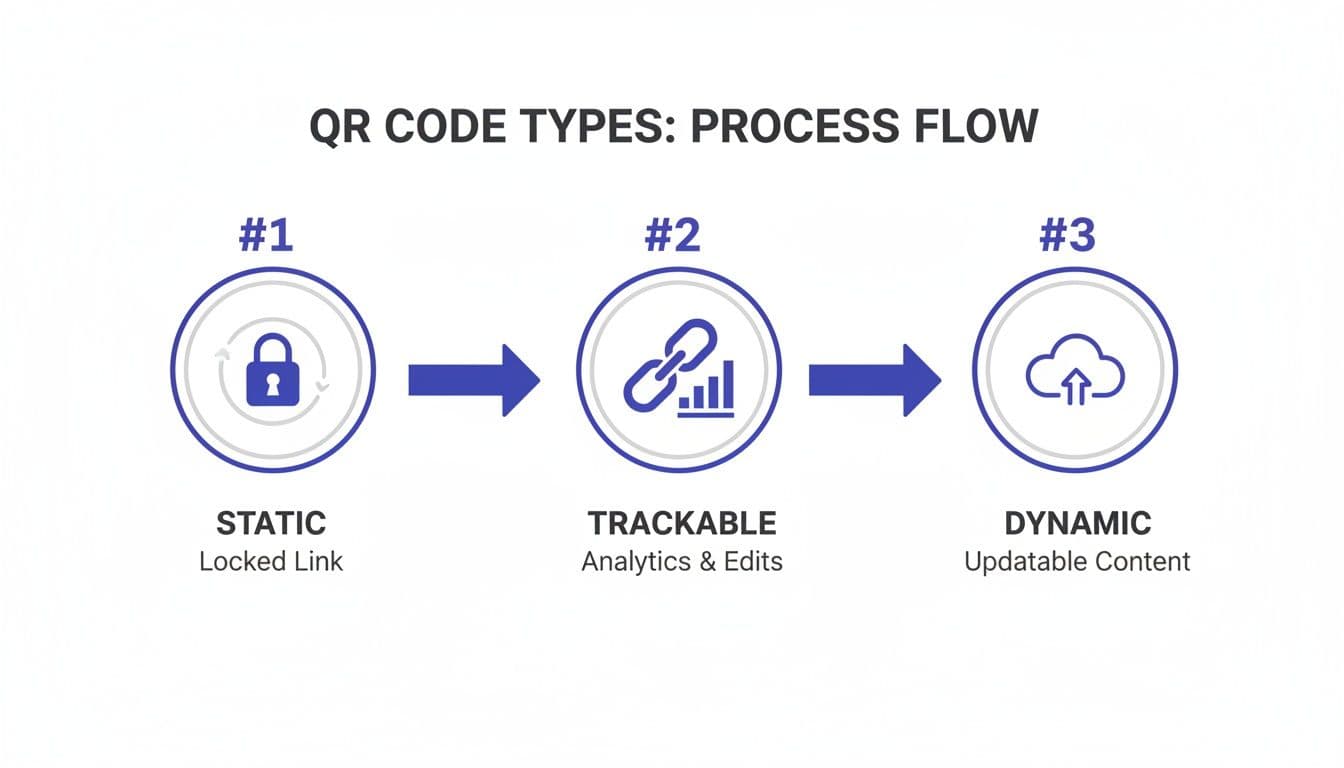
As you can see, a static code is a one-way street. A trackable code, on the other hand, creates a feedback loop of valuable performance data.
Turning Data into Actionable Insights
This information answers questions that used to be impossible to know. Is the QR code on your in-store display getting more attention than the one on your takeaway bags? When's the best time to run a promotion based on when people are actually scanning? These insights are no longer a mystery.
Practical Tip: By tracking QR code scans, you're not just collecting numbers; you're gathering clues about customer behavior that directly inform your marketing strategy and budget allocation.
The market has caught on. In 2024, dynamic QR codes already held 65% of the market share and are growing fast. Why? Because 69% of marketers update them at least monthly to tweak their campaigns based on performance data. Platforms like QR Code Maker are built for this, providing the real-time feedback needed to make those quick adjustments.
If you want to go even deeper, check out our guide on how to track QR code scans for more advanced tips.
Ultimately, every scan becomes a piece of a larger puzzle, helping you understand your customers better and refine your approach for maximum impact.
Choosing the Right Trackable QR Code Generator
Picking a trackable QR code generator is a crucial decision—it directly affects your campaign's performance and flexibility. Not all platforms are created equal, and the right one should do more than just the basics. It needs to grow with your business.
Think of it like this: a free, basic generator is like a disposable camera. It gets a single job done, but there's no room for error or adjustment. A professional platform is like a DSLR camera system—it gives you the control to adapt, refine, and perfect your work long after the first shot.
Dynamic Editing: A Non-Negotiable Feature
If there's one feature you absolutely cannot skip, it's the ability to edit your QR code's destination link after it's been printed. This is the core benefit of a dynamic QR code.
Imagine you’ve just printed 5,000 flyers for a huge event, only to find a typo in the website URL. With a static code, you’d have to scrap the entire batch—a costly, painful mistake.
With a dynamic QR code, you simply log into your dashboard, fix the link, and hit save. Instantly, every one of those printed flyers will point to the correct destination. This is a lifesaver for fixing errors, updating seasonal promotions, or even A/B testing different landing pages without reprinting your physical materials. If this is new to you, our guide on using a free dynamic QR code generator breaks it down further.
Branding and Customization Build Trust
Let's be honest: a generic black-and-white QR code can look a little untrustworthy. A branded code, on the other hand, acts as a visual handshake, reassuring people that it's safe and legitimate to scan. A professional QR code generator must offer robust customization tools.
Look for these key branding features:
- Logo Integration: Placing your company logo in the center of the code is the fastest way to build brand recognition.
- Custom Colors: Ditch the black and white. Use your brand's color palette to make the code feel like a natural part of your design.
- Frames with a Call-to-Action (CTA): A simple frame with text like "Scan for Menu" or "Get 20% Off" tells people exactly what to expect, which dramatically increases scan rates.
Best Practice: A well-branded QR code does more than just look good—it builds immediate trust with your audience, which can significantly boost engagement and scan-through rates.
Must-Have Features for Professional Use
Beyond dynamic editing and branding, a truly reliable platform needs to support your workflow and be ready to scale. As you compare different options, make sure these practical features are on your checklist.
1. High-Resolution Download Formats Your QR code has to be sharp and scannable, whether it's on a tiny business card or a massive billboard. A professional generator should let you download in multiple formats:
- PNG: Perfect for websites, emails, and any digital use.
- SVG (Scalable Vector Graphic): This is absolutely essential for print. An SVG file can be scaled to any size without losing quality, guaranteeing your code is perfectly crisp on posters, banners, and product packaging.
2. Bulk Creation and API Access If you're running a large-scale campaign—like creating unique codes for hundreds of event attendees—creating them one by one is a nightmare. Look for a platform with bulk creation, which lets you upload a CSV file to generate hundreds of unique trackable QR codes at once. For more technical needs, API access allows your developers to integrate QR code generation directly into your own software, fully automating your workflow.
3. Security and Compliance Finally, don't overlook security. Your QR codes are a touchpoint with your customers, so the platform behind them must protect everyone's data. Look for a generator that is SOC 2 compliant. This is a key industry standard certifying that the provider manages data securely to protect the privacy and interests of its clients.
Putting Trackable QR codes to Work: Practical Use Cases
Now for the fun part. Understanding the technology is one thing, but seeing how other businesses use a trackable QR code generator to get real results is where the lightbulb really goes on. These simple squares are incredibly versatile, acting as the perfect bridge between your physical marketing and your digital world.
From restaurants to real estate agents, small businesses are finding clever ways to connect with customers and gather feedback that was previously out of reach. Every scan is a new data point, helping them improve their services and measure what's genuinely working.
Real-World Examples for Your Business
These examples show how trackable QR codes solve everyday business problems. The key is to think beyond just linking to your homepage. Ask yourself: what specific action do I want the customer to take, and what can I learn from them taking it?
-
For Restaurants & Cafes: A local restaurant places a dynamic QR code on every table. It links to their digital menu, but its job doesn't stop there. By tracking the scans, the manager sees which menu sections get the most views. The QR code can also be updated to promote daily specials or link to a feedback form during off-peak hours, helping them improve service and boost their online reputation simultaneously. Another great use is for Wi-Fi sharing—a separate QR code lets customers connect to the guest network instantly without asking for a password.
-
For Event Organizers: An event manager prints unique QR codes on attendee badges. Scanning the code at session entrances lets them track which talks are most popular in real-time. A final scan at the exit can link to a quick feedback survey, providing immediate, actionable ideas for making next year's event even better. These codes can also be used on event signage to provide schedules, speaker bios, and maps.
As you can see, the applications are endless, covering everything from business cards and event badges to product packaging and sharing Wi-Fi access.
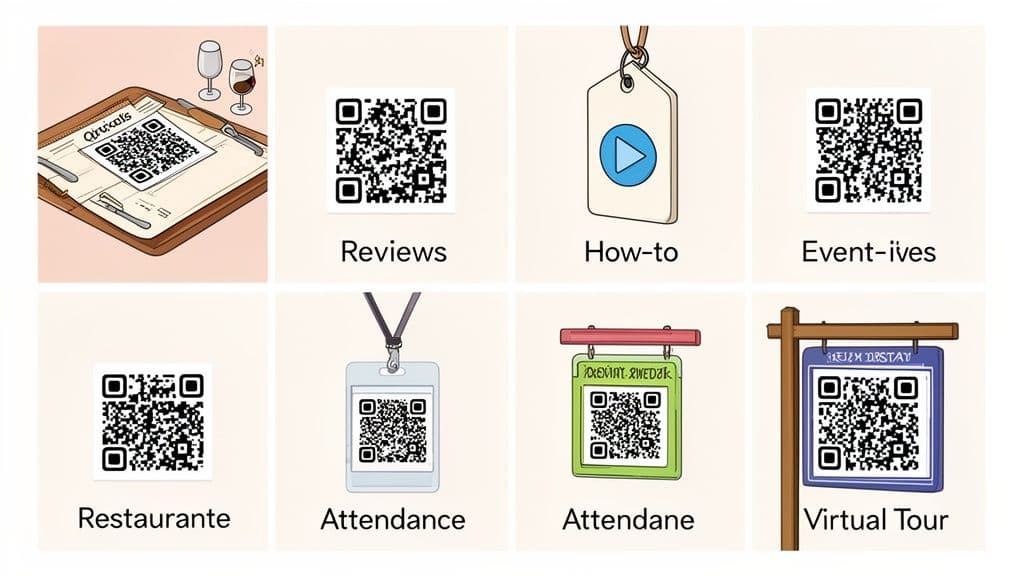
Each of these use cases is tied to a specific business goal, whether it’s streamlining operations, generating leads, or simply improving the customer experience.
More Actionable Use Cases
The ways businesses are using trackable QR codes keep growing as more people realize how powerful they are for connecting with customers in the real world.
-
For Marketers & Retailers: A clothing boutique adds a small, branded QR code to its product tags. The code offers a choice: "Scan for Styling Tips" or "Scan for 15% Off." The analytics dashboard quickly reveals that 70% of scans go to the styling video. This is a huge insight—it shows that customers value helpful content over a discount, directly informing the next marketing campaign.
-
For Small Business Owners & Consultants: A consultant adds a QR code to their business card that links to a vCard. One scan allows a new contact to save all their information—name, phone, email, website—directly to their phone's address book. This eliminates typos and makes follow-ups seamless. By making the code dynamic, the consultant can update their contact details in the future without reprinting their cards.
The global adoption of these tools is exploding for good reason. Overall QR code usage is projected to jump by a massive 323% between 2021 and 2025. This growth is partly driven by the QR code payments market, which hit USD 14.7 billion in 2024 and is expected to reach USD 38.2 billion by 2030. That shows just how integrated these codes have become in our daily lives. You can review key QR code statistics from Krofile to see the full picture.
Actionable Advice: By tying a specific, valuable action to each QR code, you can measure intent and engagement in ways that were previously impossible for offline marketing. It's about turning passive interest into active participation.
These examples are just the beginning. The goal is to find a point of friction in your customer's journey—or an opportunity to delight them—and see if a simple scan can solve it.
How to Create a Trackable QR Code in 4 Simple Steps
You've seen the power of trackable QR codes. Now, it's time to create one yourself.
Don't worry, this isn't a complex technical process. With a professional trackable QR code generator, you can go from an idea to a fully branded, campaign-ready QR code in just a few minutes.
Let's walk through the process using a platform like QR Code Maker as our example, so you can see exactly how it's done and launch your first campaign with confidence.
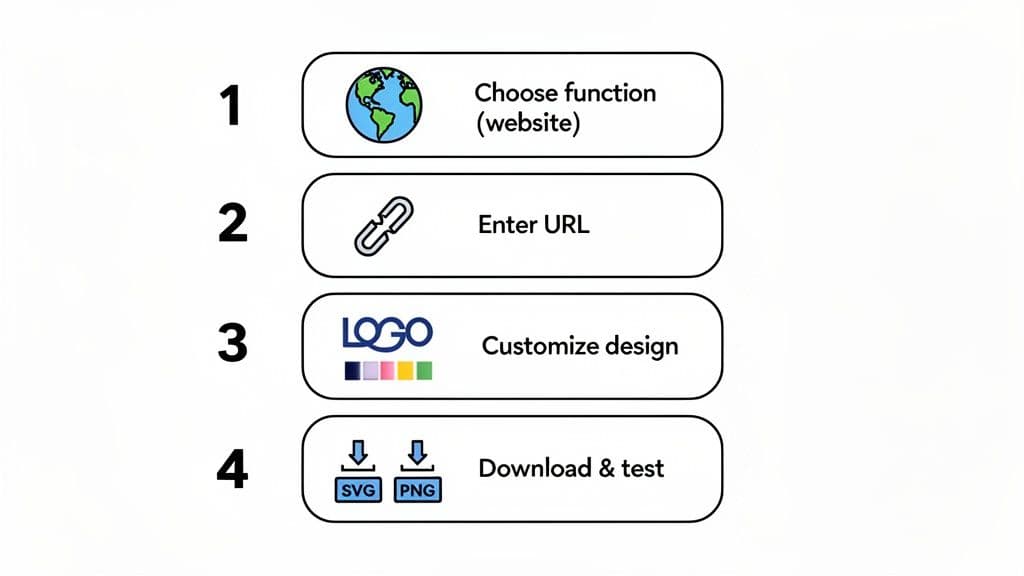
Step 1: Choose Your QR Code's Function
First things first: what do you want the QR code to do when someone scans it? This isn’t just about linking to a website; it's about creating a specific, intentional action for your audience.
A good generator will give you a menu of options, including:
- Website: The classic choice. Send people to a landing page, product page, or your homepage.
- PDF: Perfect for letting customers instantly download a restaurant menu, a detailed brochure, or a user guide.
- vCard: The modern digital business card. One scan saves your contact info directly to their phone.
- WiFi: Stop spelling out your complicated password. Let guests and customers connect with a single scan.
Step 2: Add Your Content
Once you've selected a function, simply provide the necessary information.
If you chose "Website," paste the destination URL. If you picked "vCard," you'll fill out a form with your name, email, and phone number. The process is straightforward and guided.
This is where the power of dynamic QR codes shines. The information you enter here can be changed later on, even after you’ve printed 10,000 flyers. Just make sure to double-check for typos before you move on!
Step 3: Customize Your QR Code's Design
Now for the creative part. This is where you transform a generic black-and-white box into a branded marketing asset that people trust and want to scan. A powerful trackable QR code generator will give you all the tools you need.
Focus on these three elements to make it your own:
- Add Your Logo: Upload your company logo. It sits in the center and instantly builds brand recognition.
- Use Your Brand Colors: Ditch the standard black and white. Change the pattern and background to match your company's color palette.
- Frame It with a Call to Action (CTA): Add a frame with clear instructions like "Scan Me!" or "Get Your Coupon." This tells people exactly what to expect and boosts scan rates.
Step 4: Download in the Right Format
You've designed the perfect code. Now, you just need to generate and download it. Choosing the right file type is crucial—it's the difference between a crisp, scannable code and a blurry, frustrating mess.
The rule is simple:
- Use PNG for digital applications like websites, emails, or social media posts.
- Use SVG for anything you plan to print. This vector format can be scaled to fit a business card or a massive billboard and will stay perfectly sharp.
One Final, Critical Tip: Before you send anything to the printer, test the QR code yourself. Pull out your phone and scan it. Then, ask a colleague to test it on their phone (use both an iPhone and an Android if possible). Ensure it scans easily and directs to the correct destination. This one simple step can save you the headache and expense of a reprint.
Your Pre-Launch QR Code Checklist
Before you unleash your QR code into the world, run through this quick checklist. It's a simple way to make sure every code you create is effective, professional, and ready to perform.
| Step | Action Item | Why It Matters |
|---|---|---|
| 1. Verify the Destination | Open the link/file you've connected to the code in a private browser window. | Ensures the link isn't broken and that it goes to the exact page or document you intended. |
| 2. Check the Design | Look at your logo, colors, and frame. Does it look clean and professional? | A well-branded code builds trust. A blurry logo or clashing colors can look amateurish and deter scans. |
| 3. Confirm the CTA | Read your call to action out loud. Is it clear, concise, and compelling? | People won't scan if they don't know what they're getting. "Scan for Menu" is much better than just "Scan." |
| 4. Test on Multiple Devices | Scan the code with both an iPhone (using the native camera app) and an Android device. | Catches any compatibility issues. What works on one device might not work perfectly on another. |
| 5. Choose the Right File Type | Download as an SVG for print materials and a PNG for digital use. | Using the wrong format is the #1 cause of blurry, unscannable codes, especially in print. |
| 6. Check Your Analytics | Make sure your QR code platform is set up and that you know where to find the tracking data. | You can't improve what you don't measure. Know where to look for your scan data from day one. |
Taking these few moments to double-check your work is the secret to a successful campaign. Once you've ticked these boxes, you're ready to launch with confidence.
Measuring Your QR Code Campaign ROI
Investing in a professional QR code platform isn’t an expense; it’s a tool for generating a measurable return. The entire point is to move from guessing to knowing what works. Calculating your return on investment (ROI) is much simpler than it sounds.
Most professional platforms operate on a subscription model, with different tiers based on the number of codes you need and the features you use. It's tempting to use a "free" generator, but be cautious—many come with hidden limitations. They might suddenly disable your codes or lack the essential tracking analytics that allow you to measure success in the first place.
Understanding Pricing Models
When evaluating a service, weigh the price against the value you get from features like dynamic editing, detailed analytics, and custom branding. These are what transform a simple QR code into a serious marketing asset.
- Monthly Subscriptions: These are great for flexibility. If you're running seasonal campaigns or just want to test the waters, a monthly plan lets you scale up or down as needed.
- Annual Plans: This is where you'll find the best value. Annual plans usually offer a significant discount compared to paying month-to-month, making them the most cost-effective choice if QR codes are a core part of your year-round marketing strategy.
Whatever you choose, go with a transparent provider like QR Code Maker. You want clear billing and a safety net like a 30-day money-back guarantee. You’re looking for a reliable partner, not a service that holds your codes hostage if you need to make a change.
Calculating Your Return on Investment
Once your campaign is live, you can go beyond just counting scans and start measuring real business results. The data from a professional trackable QR code generator is exactly what you need to calculate a clear ROI. By using a QR code generator with analytics, you'll have all the numbers ready to plug into some simple formulas.
ROI isn't just a buzzword; it’s a simple calculation that proves whether your marketing efforts are making you money. It answers the question: "For every dollar I spent, how many did I get back?"
Let's break it down with two practical examples.
1. Cost Per Scan (for brand awareness): Imagine you spent $200 on flyers for a local event. You check your QR code dashboard and see you got 400 scans.
- Formula: Total Campaign Cost / Total Scans = Cost Per Scan
- Calculation: $200 / 400 scans = $0.50 per scan
Just like that, you know it cost you fifty cents to get a potential customer to pull out their phone and engage with your brand.
2. Cost Per Lead (for lead generation): Now, say you put a QR code on a business card that links to your contact form. The cards cost $50, you got 100 scans, and 10 of those people filled out the form, becoming new leads.
- Formula: Total Campaign Cost / Total Leads = Cost Per Lead
- Calculation: $50 / 10 leads = $5.00 per lead
This is an incredibly powerful metric. It proves the value of your investment and shows how your offline materials can become a predictable lead-generation machine.
Common Questions About Trackable QR Codes
Getting started with trackable QR codes usually brings up a few key questions. As a business owner, marketer, or event organizer, you want to be sure you’re making a smart investment. Let's walk through the most common queries we hear from professionals using a trackable qr code generator for the first time.
Can I Change the Link on a QR Code After Printing It?
Yes, you absolutely can—this is the single biggest advantage of using a trackable (or dynamic) QR code. The physical code you print doesn't contain the final destination link itself. Instead, it points to a short, flexible URL managed by your generator service.
This means you can log into your dashboard anytime and change where that short URL redirects people. The QR code on your flyers, posters, or packaging stays exactly the same, but it will instantly start sending new scanners to the updated link. This on-the-fly control is impossible with old-school static QR codes.
Do Trackable QR Codes Have a Scan Limit?
Professionally generated dynamic QR codes have no technical scan limit. They can be scanned an infinite number of times without "wearing out."
However, the specific subscription plan you choose from a trackable qr code generator might have monthly or annual scan allowances, especially on free or starter tiers. It's always a good practice to check the plan details to ensure your campaign's expected traffic won’t be unexpectedly cut off.
What Happens to My QR Codes if I Cancel My Subscription?
This is a critical question and a policy you must verify before committing to any provider. With some services, if you cancel your subscription, your dynamic QR codes will simply stop working, leading users to an error page. This can be a disaster if you have thousands of printed materials out in the world.
Best Practice: Reputable platforms like QR Code Maker ensure your codes continue to redirect to their destination even if you move to a free plan; you simply lose access to advanced editing and the detailed analytics dashboard. Always verify a provider’s policy on this before you print anything.
Are Trackable QR Codes Safe for My Customers to Use?
Security should be a top priority. A trustworthy trackable qr code generator puts safety first by using encrypted (HTTPS) links for all redirects and hosting its services on secure, reliable infrastructure.
Look for providers that are compliant with rigorous security standards like SOC 2. This isn't just a buzzword; it's a third-party audit that proves a company's commitment to protecting your business and customer data. Another simple but powerful tip: branding your QR code with your company logo helps build immediate trust and assures customers that your code is legitimate and safe to scan.
Ready to create QR codes you can count on? With QR Code Maker, you get a secure, flexible, and powerful platform designed for business growth. Start your free trial today and see how easy it is to launch your first trackable campaign.
Ready to create your QR code?
Free forever for static codes. Pro features with 14-day trial, no credit card required.
Irina
·Content LeadIrina leads content strategy at QR Code Maker, helping businesses understand how to leverage QR codes for marketing, operations, and customer engagement. Her expertise spans digital marketing, user experience, and practical implementation guides.
Learn more about us →Related Articles
10 Essential QR Code Best Practices for Your Business in 2026
Unlock the full potential of your campaigns with our guide to QR code best practices. Learn design, tracking, and placement for maximum engagement.
How Do QR Codes Work? A Simple Guide for Businesses
Discover how do QR codes work, from their basic components to dynamic analytics. Learn to use them effectively for marketing, events, and business growth.
How to Supercharge Your Ads with QR Codes: A Practical Guide
Discover how to leverage advertisements with qr codes to engage customers, measure results, and optimize your campaign for real-world impact.