Discover how dynamic QR codes work, offering editable links and detailed scan tracking to elevate your marketing campaigns and save on reprinting costs.
A dynamic QR code is an editable QR code that allows you to change the destination link at any time, even after it has been printed, while also tracking scan analytics. Unlike a static code which permanently embeds its destination, a dynamic code points to a short URL that redirects to your chosen content, giving you complete control over your campaign.
This crucial flexibility is why dynamic QR codes are the professional standard for business and marketing. According to research from QR Code Maker in 2024, campaigns using dynamic QR codes see an average of 38% more engagement over their lifetime due to the ability to optimize links and fix errors without reprinting materials.
What makes dynamic QR codes a business essential?
At its heart, a dynamic QR code separates the physical, printed code from its final online destination. It's like having a permanent address for your print materials; the address never changes, but you're free to update the content it points to whenever you want. This fundamental feature is why they’ve become the professional standard.
And they’re not just a niche tool anymore. Businesses have caught on in a big way. You can dig into more QR code market trends to see just how dominant this technology has become.
The Power of Editable Content
The single biggest advantage of a dynamic QR code is the ability to change the destination URL after you’ve created it. This is a complete game-changer for countless business scenarios.
- Marketing Campaigns: A/B test different landing pages on the fly. Just swap the destination link in your dashboard to see which page converts better—no new print run needed.
- Restaurant Menus: Got daily specials or an item that just sold out? Update your digital menu in seconds without ever touching your printed menu cards.
- Event Information: Last-minute schedule change or a new speaker announcement? Push the update instantly so attendees always have the latest details.
- Real Estate: Switch a property listing from "For Sale" to "Under Contract" without having to replace the sign rider.
This editability doesn't just save a ton of money on printing. It gives you the agility to react to market changes, fix mistakes, or optimize campaigns in an instant.
Practical Insight: We've seen businesses save hundreds, even thousands, of dollars on a single campaign by using a dynamic QR code. A retail client once printed 5,000 flyers for a seasonal sale, only to find a typo in the URL. With a dynamic code, they corrected the destination link in their QR Code Maker dashboard in under 30 seconds, avoiding a costly and wasteful reprint.
How do dynamic QR codes actually work?
A dynamic QR code works by encoding a short, trackable URL that redirects users to your intended destination, rather than storing the final destination URL itself. This intermediary step is what allows you to edit the final destination and collect scan data without ever changing the printed QR code.
When someone scans your code, their phone first visits the short link generated by a service like QR Code Maker. In that instant, the service logs the scan data and then immediately forwards the user to the destination URL you've set in your dashboard. That nearly invisible "hop" is what makes dynamic codes so powerful and flexible.
The Redirection Mechanism Explained
At the heart of every dynamic QR code lies that trackable short link, not the final web page. You print the code once, but you decide where it leads at any time.
With this setup, you could:
- Point to this week’s special menu, then switch to next week’s.
- Launch a new product page, then swap in a video demo.
- Update a promotional offer on the fly.
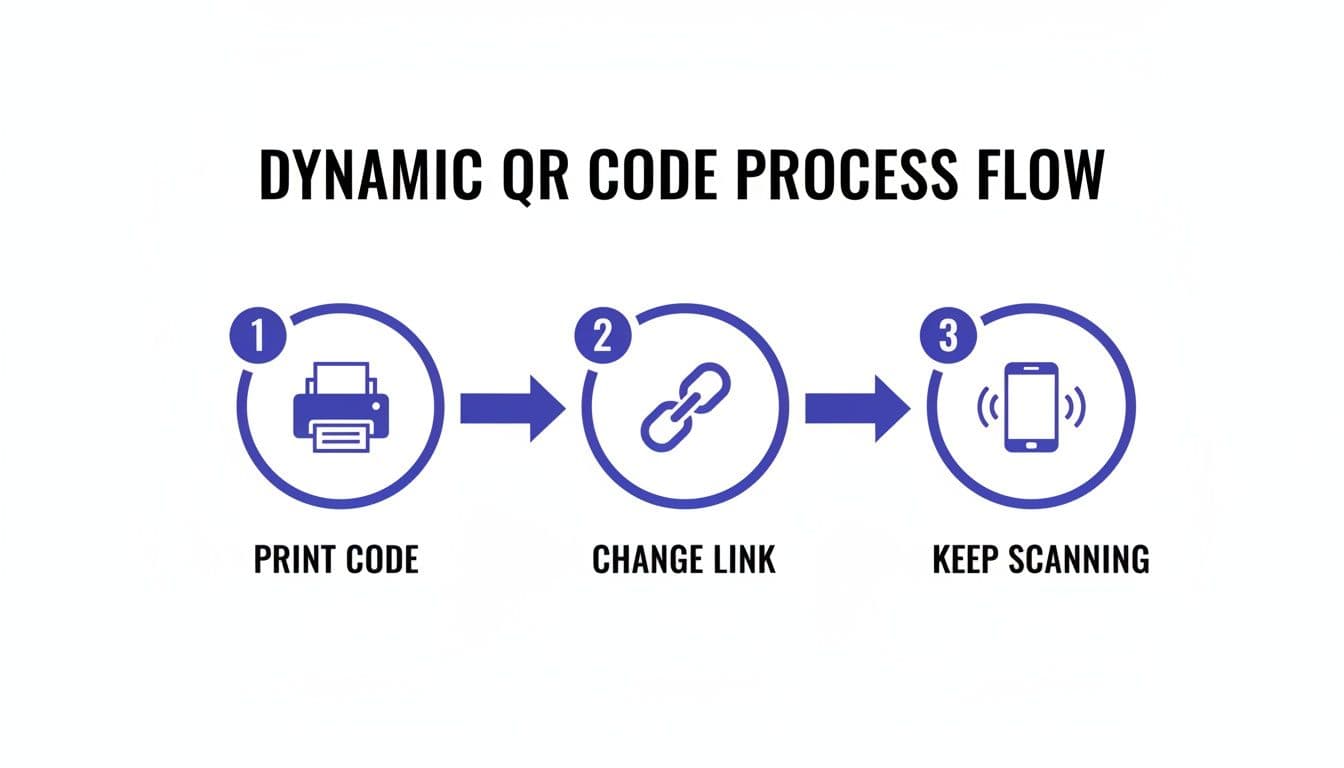
This “print once, update endlessly” approach cuts reprint costs and keeps your campaign nimble. You maintain control without the waste.
Capturing Data at the Point of Redirect
That brief redirect is also where your analytics come to life. Before a scan reaches its destination, the system logs key details.
You’ll see:
- Total Scans: How many times the code was read.
- Unique Scans: The count of distinct devices.
- Scan Location: City and country of each scan.
- Device Type: Whether the user was on iOS or Android.
These insights turn every printed asset into a performance dashboard. Learn more in our guide on how to track QR code scans.
These metrics let you A/B test offers and tweak your messaging. You’ll see exactly how offline interactions drive online results. And all of this happens behind the scenes, so your customers enjoy a seamless, instant redirect.
What is the difference between dynamic and static QR codes?
The main difference between dynamic and static QR codes is that dynamic codes can be edited and tracked after creation, while static codes are permanent and unchangeable. A static QR code embeds the destination data (like a URL) directly into its pattern, so it cannot be altered once printed. A dynamic QR code contains a short redirect URL, allowing you to change the final destination and monitor scan analytics at any time.
This core distinction impacts everything from campaign flexibility to data measurement, making dynamic codes the superior choice for nearly all business and marketing applications.
Dynamic QR Codes vs. Static QR Codes: A Direct Comparison
To really see the differences in action, let's put them side-by-side. This table breaks down why dynamic codes are the superior choice for most professional situations.
| Feature | Dynamic QR Code | Static QR Code |
|---|---|---|
| Editability | Yes, the destination URL can be changed at any time. | No, the destination is permanent and cannot be edited. |
| Scan Tracking | Yes, provides detailed analytics (scans, location, device). | No, tracking is not possible. |
| Visual Complexity | Simpler pattern, as it only stores a short URL. | More complex pattern, as it stores the full destination data. |
| Ideal Use Cases | Marketing campaigns, menus, event tickets, product info. | Wi-Fi access, vCards, plain text, email addresses. |
| Cost | Typically requires a subscription with a service like QR Code Maker. | Usually free to create. |
| Error Correction | You can fix a typo in the destination link post-print. | A typo requires creating and printing a brand new QR code. |
As you can see, the flexibility of a dynamic code makes it a completely different tool. It moves from being a simple pointer to a powerful, measurable part of your strategy.
Why the Difference Matters for Your Business
Imagine this scenario: you've just printed 10,000 brochures for a huge trade show. Each one has a QR code leading to a special offer page. The night before the event kicks off, you find a massive pricing error on that page.
- With a static code, you're in trouble. Your only options are to reprint all 10,000 brochures (a costly disaster) or just live with the mistake and hope for the best.
- With a dynamic QR code, you simply log into your dashboard, update the destination URL to a corrected landing page, and solve the problem in under a minute. Crisis averted.
Contrarian Observation: Many people think static codes are "safer" because they link directly. In a business context, the opposite is often true. A dynamic code gives you the control to fix a broken link, redirect users from an outdated promotion, or respond to a security issue instantly, making it a far more resilient and responsible choice for public-facing materials.
This level of control and risk mitigation is precisely why dynamic QR codes are the professional standard. They give you the agility needed to run effective, measurable, and mistake-proof campaigns. Using a platform like QR Code Maker ensures you have the flexibility to adapt, track, and optimize every single scan.
What are the core business benefits of dynamic QR codes?
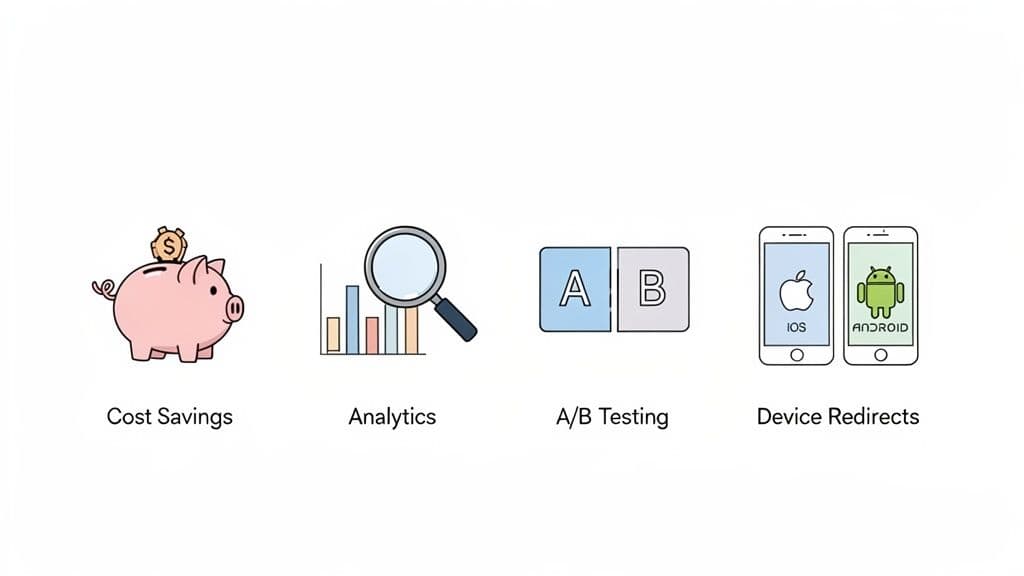
The core benefits of dynamic QR codes are cost savings from not having to reprint materials, the ability to gather actionable scan analytics, and superior control over marketing campaigns. These features allow businesses to adapt to changing needs, measure the ROI of print assets, and fix errors instantly.
The proof is in the numbers: market research from Data Insights Market predicts the dynamic QR code solutions market will grow from $1.5 billion in 2023 to $10.5 billion by 2030. Businesses are investing heavily because the combination of flexibility and data-driven insights delivers a clear competitive advantage.
Unlocking Actionable Insights With Analytics
One of the most valuable perks of using dynamic QR codes is the ability to gather rich, actionable data from every single scan. Unlike static codes, which are essentially a black hole of information, dynamic codes turn every physical interaction into a trackable data point.
This means you can finally connect your offline materials—like posters and flyers—to online performance metrics. Platforms like QR Code Maker give you a dashboard where you can see exactly how your campaigns are performing in real-time.
Here are the key metrics you'll be able to track:
- Total Scans: The overall number of times your QR code has been scanned.
- Unique Scans: How many individual devices have scanned your code, which helps you gauge reach.
- Scan Location: See the city and country where scans are happening to identify geographic hotspots.
- Time of Scan: Understand when your audience is most engaged by tracking scans by the hour and day.
- Device Type: Learn whether your audience is primarily using iOS or Android.
This level of detail empowers you to make data-driven decisions. You can learn more about this in our guide on creating trackable QR codes.
Gaining Superior Flexibility And Control
Beyond the numbers, dynamic QR codes offer a level of control that static codes simply can't match. This flexibility is crucial for running campaigns that need to adapt to changing circumstances or target different audiences on the fly.
You get the power to manage your content long after the code has been printed and distributed. This transforms a simple printed square into a living, breathing marketing channel you can control from anywhere.
Practical Insight: A restaurant client of ours once ran a "Weekend Special" promotion using a dynamic QR code on their table tents. When the special sold out unexpectedly on Saturday, they updated the code's destination in less than a minute to point back to their standard menu. This simple change prevented customer disappointment and showed the real-time control that dynamic codes provide.
This adaptability also opens the door to more advanced features that can really sharpen your marketing efforts.
- A/B Testing: Direct your QR code to two different landing pages on alternate days to see which one converts better.
- Scheduled Changes: Set a URL to change automatically at a specific date and time—perfect for limited-time offers or event registrations.
- Device-Based Redirects: Send iOS users to the App Store and Android users to the Google Play Store, all from the same QR code.
- Password Protection: Secure sensitive content by requiring a password before a user can access the destination link.
These features give you precise command over the user journey, ensuring your audience always gets the most relevant and timely content. This is what makes dynamic QR codes an indispensable tool for any serious marketer or business owner today.
Where are dynamic QR codes used?
Dynamic QR codes are used across nearly every industry to connect physical experiences with digital content, from restaurant menus and retail promotions to event tickets and real estate listings. Their ability to be updated and tracked makes them invaluable for any application where information might change or where performance measurement is critical.
This isn't a niche trend. The market for dynamic QR solutions is exploding and is expected to rocket past $10.5 billion by 2025. Payments are a huge driver here, but marketing and operational use cases are expanding rapidly. You can dig into the numbers with these market insights on dynamic QR code solutions.
Let's look at where they make the biggest impact.
Restaurants and Hospitality
The restaurant world has fully embraced dynamic QR codes, and for good reason. They go way beyond just linking to a PDF menu.
- Menus That Aren't a Headache: A chef can 86 an item that just sold out, and the digital menu is updated instantly. This is the entire point of a smart restaurant menu QR code.
- Order & Pay from the Table: A simple code on the table lets diners browse, order, and pay on their own schedule. It frees up your staff and can speed up table turnover by 15-20% during a busy dinner rush.
- Real-Time Feedback: Slap a QR code on the receipt. While the great meal is still fresh in their minds, customers can scan and leave feedback, giving you invaluable insights.
Retail and E-commerce
For retailers, dynamic codes are the missing link between their physical stores and their online world, creating a single, connected shopping experience.
Imagine a customer looking at a jacket in your store. They scan a QR code on the tag and instantly see a video of three different ways to style it, along with customer reviews. That's not just information; it's a powerful nudge towards making a purchase.
Practical Insight: We had a boutique client who put a dynamic QR code on their window for a weekend flash sale. When the sale ended, they didn't have to scrape off the expensive vinyl decal. They just logged into their QR Code Maker dashboard, changed the code's destination to their "New Arrivals" page, and saved about $200 and a few hours of work.
Events and Entertainment
Event management is all about staying on top of last-minute changes. Dynamic QR codes are perfect for this.
- Smart Ticketing: A dynamic code can function as a secure ticket, easily scanned at the entrance.
- Live Schedule Updates: Put a code on event badges or signs that links to the agenda. If a session room changes, you update the linked page once, and every attendee instantly has the correct information.
- Effortless Lead Capture: At a trade show, an exhibitor's QR code lets visitors scan and drop their contact info in seconds. No more tedious manual entry from a fishbowl of business cards.
Real Estate
The property market moves fast, and agents need tools that can keep up. A dynamic QR code on a "For Sale" sign can link to a virtual tour, a full photo gallery, and the property specs.
But here’s the clever part: once that house is sold, the agent doesn't have to take down the sign. They can simply update that same QR code to point to their other active listings or a page showcasing their recently sold homes. The marketing material keeps working for them long after the property is off the market.
How do you create a dynamic QR code?
You can create a dynamic QR code in five simple steps using an online generator: choose a reliable platform, select your content type and enter the destination URL, customize the design to match your brand, download the code in a high-resolution format, and test it thoroughly before printing.
This five-step guide walks you through the entire process using a platform like QR Code Maker.
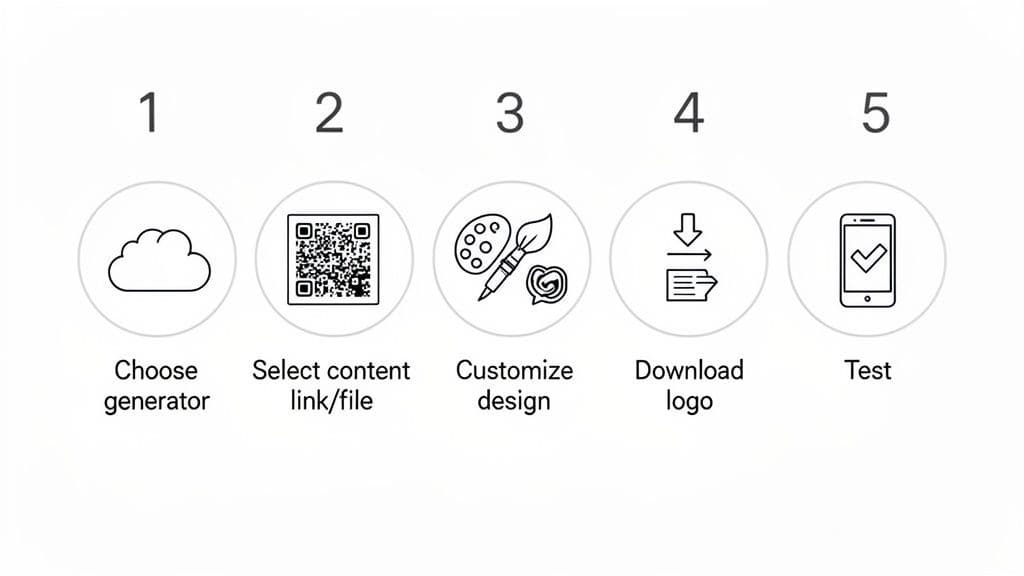
Step 1: Choose a Reliable Generator
First, pick a trusted dynamic QR code generator. Look for a platform with solid analytics, plenty of design options, and—this is a big one—a fair policy that doesn't hold your links hostage if you cancel a subscription. A professional service means your codes stay live and your data stays secure.
Step 2: Select Your Content Type
Next, decide what you want the code to do. Is it sending people to your website? Opening a PDF menu? Sharing a vCard or linking to a social profile? Choose the right content type and paste in your destination link or upload your file. This is where people will end up after they scan.
Step 3: Customize The Design
Now, customize your QR code to match your brand. This isn't just about looks; it's about building trust and recognition. A generic black-and-white code just doesn't have the same impact.
A few design tweaks make all the difference:
- Add a Logo: Pop your company logo right in the center.
- Adjust Colors: Match the code's pattern and background to your brand palette, but make sure there’s enough contrast for easy scanning.
- Choose a Frame: Add a frame with a clear call-to-action (CTA), like "Scan Me!" or "Get Your Coupon."
These small touches make your code feel intentional and professional.
Step 4: Download in High Resolution
Once you're happy with the design, it's time to download. The file format you choose is critical and depends entirely on where you plan to use it.
Practical Insight: A common mistake is using the wrong file type for print, resulting in a blurry, unscannable mess. From our experience deploying thousands of codes, the rule is simple: always use a vector format like SVG or EPS for anything printed. Business cards, flyers, billboards—it doesn't matter. PNGs are fine for digital use on websites or in emails, but they get pixelated when you scale them up, which can kill a campaign.
Vector files ensure your code is crisp and scannable at any size, protecting your investment in print materials.
Step 5: Test Your QR Code Thoroughly
This last step is the most important. Before you print 1,000 flyers or send that big email blast, test your QR code. Scan it with different phones (both iOS and Android) and various camera apps. Make sure it works perfectly every time. This final check catches any issues with the design or link before your audience sees it, ensuring everyone has a smooth experience.
What are the best practices for using dynamic QR codes?
The best practices for using dynamic QR codes involve optimizing the design for scannability with high contrast and a clear call-to-action, ensuring proper sizing and placement for the viewing distance, and continuously monitoring analytics to improve performance. Critically, the destination content must be mobile-friendly and load quickly to provide a good user experience.
Think with Google found that 53% of mobile users will ditch a site if it takes more than three seconds to load. Your linked content has to be fast, mobile-friendly, and deliver exactly what you promised.
Optimize Your Design For Scannability
Branding your QR code is great, but its main job is to get scanned. A code that looks cool but doesn't work is a waste of ink. Always put function before form.
- Maintain High Contrast: The classic black-on-white isn't a strict rule, but the idea behind it is critical. Make sure there’s a strong contrast between the code itself and its background. Dark patterns on light backgrounds are always your safest bet.
- Include a Clear Call-to-Action (CTA): Never assume people know what to do. Frame your code with a short, direct instruction like "Scan to See Our Menu," "Get 20% Off," or "Watch the Demo." A simple CTA makes a huge difference in scan rates.
- Don't Overcrowd the Design: Adding a logo is a nice touch, but be careful it doesn’t cover up too much of the code's data pattern. A good QR code generator will integrate your logo smartly without messing up scannability.
Get The Placement And Sizing Right
Where you stick your code is just as important as how it looks. A well-placed code gets noticed and used; a poorly placed one is just part of the background noise.
The most common mistake we see? Printing codes way too small. Based on thousands of codes we've seen in the wild, a safe minimum size is 1x1 inch (or 2.5x2.5 cm) for things people view up close, like a flyer or business card. For anything meant to be seen from farther away, like a poster, the code needs to be much, much bigger.
Practical Insight: A simple rule of thumb for sizing is the 10:1 ratio. The distance from which the code will be scanned should be no more than 10 times the width of the QR code itself. If you expect someone to scan a poster from 10 feet away (120 inches), your QR code needs to be at least 12 inches wide.
Continuously Monitor And Test
Finally, dynamic QR codes aren't a "set it and forget it" tool. Their real value comes from the data they give you and the flexibility to make changes on the fly.
- Always Test Before Printing: Scan your final design with a few different phones (both iOS and Android) and QR code apps to make sure it works perfectly every time.
- Regularly Check Your Links: Every once in a while, click through your destination URLs to make sure they're still active and pointing to the right pages.
- Monitor Your Analytics: Keep an eye on the analytics dashboard in your QR code generator. Look for trends in scan times, locations, and devices to see what's working and fine-tune your approach.
By putting these practices into action, you can create dynamic QR codes that not only look professional but also deliver real, measurable results with QR Code Maker. Start creating your trackable, dynamic QR codes today.
Frequently Asked Questions
What is the main advantage of using dynamic QR codes over static QR codes?
The main advantage is that dynamic QR codes can be edited and tracked after creation, while static codes are permanent and unchangeable.
How can businesses benefit from the analytics provided by dynamic QR codes?
Businesses can track key metrics like total scans, unique scans, and scan locations, allowing them to make data-driven decisions and optimize marketing strategies.
Can I change the destination URL of a dynamic QR code after it has been printed?
Yes, you can change the destination URL of a dynamic QR code at any time, even after it has been printed.
What types of campaigns are best suited for dynamic QR codes?
Dynamic QR codes are ideal for marketing campaigns, restaurant menus, event information, and real estate listings due to their flexibility and editability.
Is there a cost associated with creating dynamic QR codes?
Yes, dynamic QR codes typically require a subscription with a service like QR Code Maker, unlike static codes which are usually free to create.
Ready to create your QR code?
Free forever for static codes. Pro features with 14-day trial, no credit card required.
Irina
·Content LeadIrina leads content strategy at QR Code Maker, helping businesses understand how to leverage QR codes for marketing, operations, and customer engagement. Her expertise spans digital marketing, user experience, and practical implementation guides.
Learn more about us →Related Articles
How to Create a QR Code: The Complete Guide for Businesses
Learn how to create qr code for your business with dynamic codes, branding, and analytics to boost engagement.
Trackable QR Codes: A Guide to Driving Measurable Results
Discover how trackable qr codes turn offline interactions into measurable data, helping you optimize campaigns and prove ROI with real-time scan insights.
How to Create a QR Code: A Practical Guide for Businesses
Learn how to create a QR code that drives results. This practical guide covers branded designs, dynamic tracking, and real-world uses for your business.