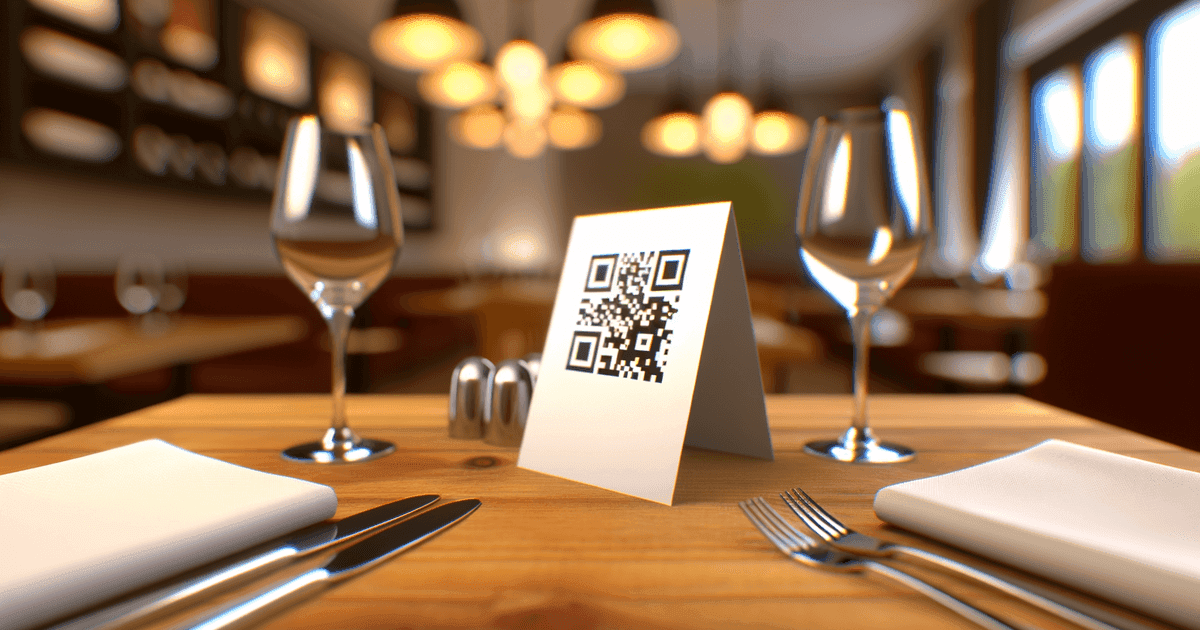
Create a branded, dynamic restaurant menu QR code that enhances the dining experience, boosts efficiency, and provides valuable guest insights. Learn how.
A restaurant menu QR code is more than just a link—it's a direct gateway to your menu on a customer's phone. For small business owners and restaurant managers, this simple tool has become a strategic asset, delivering significant cost savings, smoother operations, and a better guest experience. This guide provides actionable advice and clear steps to help you create a professional QR code menu that works for your business.
Why Smart Restaurants Are Embracing QR Code Menus

The restaurant menu QR code has evolved far beyond its role as a temporary solution for contactless service. What began as a necessity is now a powerful tool that savvy restaurant owners use to streamline daily tasks, keep guests happy, and boost their bottom line. The days of expensive, last-minute menu reprints are over.
With a dynamic digital menu, you can update daily specials or mark an item as sold out with just a few clicks. This means no more awkward conversations with guests about unavailable dishes, leading to a smoother service flow and happier diners. This flexibility is a game-changer for managing inventory and rotating seasonal offerings.
Enhancing the Guest Experience
A digital menu can do much more than list items. Smart restaurants use QR codes to create a richer, more informative dining experience. By incorporating a few key features, you can cater to a wider audience and help customers order with confidence.
-
High-Quality Photos: Showcase your dishes with vibrant, professional images that entice customers to order. A picture of a juicy burger is far more compelling than a text description alone.
-
Detailed Descriptions: Go beyond a basic ingredient list. Tell the story behind a dish to build anticipation.
-
Allergen and Dietary Filters: Allow guests with specific needs to easily find safe and appealing options.
-
Multi-Language Options: Welcome international guests by offering your menu in their native language.
Practical Tip: A well-designed digital menu doesn't just replace paper; it elevates the entire ordering process. It transforms a simple transaction into an interactive and personalized experience for every guest.
A Shift in Customer Behavior
The rapid adoption of QR codes has changed diner expectations. After the pandemic normalized contactless experiences, QR code menus in restaurants went from a novelty to a mainstream tool.
Industry trackers saw adoption for restaurant QR code use jump by roughly 150% in just two years. Platform-level data shows that 78% of first-time visitors will scan a table's QR code almost immediately upon being seated.
This proves that your guests are comfortable and familiar with the technology. By adding a restaurant menu QR code, you're not just meeting modern customer expectations—you're unlocking significant operational benefits. To learn more about the technology itself, explore how QR codes work and what makes them so effective.
Create Your Restaurant Menu QR Code
Skip the complicated setup. Our restaurant menu builder includes everything you need—menu editing, photos, dietary tags, and automatic QR code generation. No website required.
Step 1: Design a Menu That Shines on a Smartphone Screen
Before generating a QR code, ensure your menu is optimized for a mobile screen. Simply saving your print menu as a PDF won't work. A design that looks great on paper often becomes a frustrating, endless scroll on a phone.
The goal is to make the digital experience effortless and appetizing, guiding diners from browsing to ordering without a hitch.
Start by rethinking the structure. Instead of a single-page design, break your menu into logical, collapsible categories like "Appetizers," "Mains," "Desserts," and "Drinks." This allows people to quickly navigate to what they want. It’s a small but crucial change—studies show users will abandon a site if it's hard to navigate.
Writing Descriptions That Sell
On a digital menu, your dish descriptions do the heavy lifting. Move beyond a simple ingredient list and tell a story that makes people hungry. A great description can be the deciding factor between two dishes.
For example, instead of "Chicken, rice, vegetables," write, "Pan-seared chicken breast over a saffron-infused risotto with locally-sourced, roasted seasonal vegetables." The second version paints a picture, implies quality, and helps justify the price.
Best Practice: Your menu isn't just an inventory list; it's your single most important marketing tool. Every word should build anticipation and showcase the care that goes into every plate.
The Power of Professional Photos
We eat with our eyes first. Including high-quality, professional photos of your dishes is one of the fastest ways to boost sales. A vibrant picture of your signature burger will always be more persuasive than text alone.
Ensure your photos are well-lit, appetizing, and an honest representation of the dish. Consistent styling across all photos reinforces your restaurant's brand and makes the menu feel more polished. This investment pays for itself almost immediately in increased orders.
Choosing Your Digital Menu Format
With your content ready, it’s time to decide how to present it. There are two main paths, each with pros and cons for a busy restaurant owner.
-
Simple PDF Menu: This is the quickest way to get started. Design a mobile-friendly PDF, upload it, and link your QR code to it. It's easy to create and update. The downside? It's static, with no interactive features like filtering or in-app ordering.
-
Interactive Menu Platform: Tools like the restaurant menu builder from QR Code Maker allow you to build a dynamic, web-based menu. These platforms are designed for this purpose, offering features like allergen info, multiple languages, and even integrations with ordering systems.
The right choice depends on your budget, technical comfort, and long-term goals. A PDF is a great starting point, but an interactive platform delivers a richer customer experience and provides more powerful tools.
Step 2: Create a Branded, Scannable QR Code
Once your digital menu is ready, the next step is creating the QR code itself—the gateway connecting guests to your culinary creations.
This is more than a technical step; it’s a branding opportunity. A generic black-and-white square works, but a custom, branded code instantly communicates professionalism and reinforces your restaurant's identity.
Making the right choice early on about your menu's format—whether a simple PDF or an interactive platform—will guide how you use your QR code.
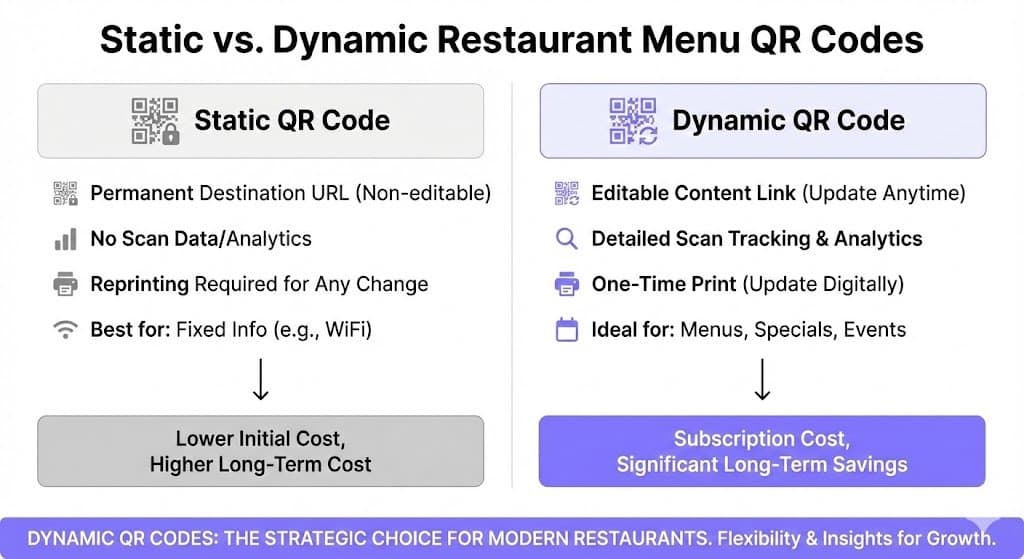
As the decision tree shows, an interactive menu unlocks a far richer experience, and the right QR code is key to making that happen seamlessly.
Why Dynamic QR Codes are a Restaurant's Best Friend
When you generate a QR code, you'll face a choice: static vs. dynamic.
A static QR code permanently embeds your menu's URL into the pattern. If you need to update the menu—even to fix a typo—you must generate a new QR code and reprint everything. For a restaurant, this is impractical.
A dynamic QR code is the solution. It contains a short, redirect link that you control. Need to change happy hour prices or roll out a seasonal menu? Simply log in and change where that link points. The printed QR code on your tables never has to change.
This flexibility isn't just a nice-to-have; for a busy restaurant, it's essential.
Static vs Dynamic QR Code for Your Restaurant Menu
| Feature | Static QR Code | Dynamic QR Code |
|---|---|---|
| Editable Content | No. The destination is permanent. | Yes. Change the menu link anytime. |
| Scan Tracking | No. You have no data on usage. | Yes. See how many scans you get and when. |
| One-Time Print | No. Every menu change requires reprinting. | Yes. Print once, update forever. |
| Long-Term Cost | Low initial cost, high reprinting costs. | Subscription-based, eliminates reprinting costs. |
| Best For | Permanent info like your WiFi password. | Anything that changes: menus, specials, events. |
For any restaurant, the long-term savings in time and money make dynamic QR codes the clear winner. You print once and can update your menu infinitely.
Customizing Your Code for Maximum Impact
Using a trusted solution like QR Code Maker's restaurant menu builder, you can transform a functional code into a sharp, on-brand touchpoint. A few small tweaks make a massive difference.
Here’s how to make your QR code stand out:
-
Add Your Logo: This is the most effective way to brand your code. Placing your restaurant's logo in the center tells customers the code is official and safe. For guidance, see our simple tutorial on adding logos to your QR codes.
-
Use Brand Colors: Ditch the default black and white. Using your restaurant's signature colors helps the QR code blend seamlessly with your decor.
-
Add a Frame with a Call-to-Action (CTA): Don't make guests guess. A simple frame with a clear instruction like "Scan for Menu" or "View Our Drinks" removes ambiguity and encourages scans.
By customizing your code, you create a professional touchpoint that enhances your brand while functioning perfectly.
Step 3: Print and Place Your QR Code Effectively
You’ve designed a slick, on-brand QR code. Now it’s time to get it in front of your hungry guests. This step is all about simple practicality.
A QR code that won't scan is worse than no QR code at all. The biggest issue is often poor contrast. The small squares (modules) need to be easily distinguishable by a phone camera. If using brand colors, ensure the foreground is significantly darker than the background.
Practical Tip: Before printing in bulk, print one test code. Scan it with different phones (iPhone, Android) and in various lighting conditions. This five-minute check can save you from a costly printing mistake.
Choosing the Right Size and Material
Size and material are crucial for scannability. If the code is too small, a camera can't focus.
As a baseline, never print a QR code smaller than 1 inch by 1 inch (2.5 cm x 2.5 cm). For posters scanned from a distance, you'll need to scale it up.
The material is just as important. Avoid glossy or reflective surfaces. The glare from restaurant lighting can make scanning impossible. A matte finish is always the safer choice.
Smart Placement for Maximum Visibility
Place your QR code where guests are already looking. The goal is to make scanning feel natural, not like a chore.
Here are a few proven placements:
-
Table Tents: A classic for a reason. A simple tent or acrylic holder puts the code at eye level.
-
Table Stickers: For a cleaner look, a durable sticker placed directly on the table or a condiment caddy works well.
-
At the Entrance: A larger, framed QR code at the host stand lets people browse the menu while they wait, speeding up ordering once seated.
-
On Coasters: A clever touch that integrates the menu into the table setting.
Most restaurants find a combination works best: a large code at the entrance and smaller ones at every table.
Step 4: Use Scan Data to Understand Your Customers
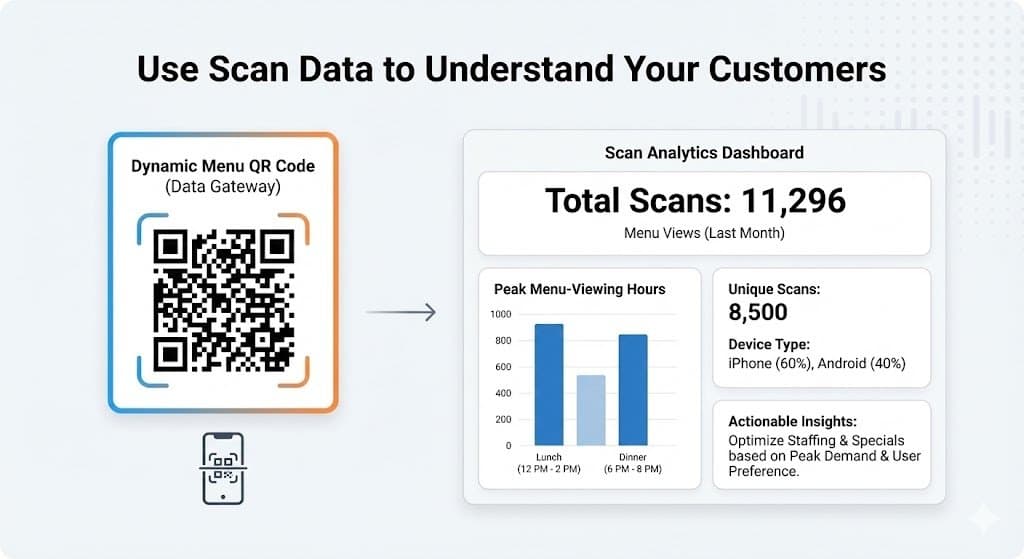
Your restaurant's QR code is more than a link—it’s a data goldmine. With a dynamic QR code, you unlock a simple analytics dashboard that provides a direct window into customer behavior.
Forget complicated spreadsheets. This is about clear, actionable insights that help you make smarter decisions.
Imagine knowing your busiest menu-viewing times before the first order is placed. This data helps you fine-tune staffing schedules to meet actual demand. It gives you a real-time pulse on your restaurant’s rhythm.
Key Metrics to Track
The analytics dashboard from QR Code Maker's restaurant menu tool presents crucial metrics in an easy-to-understand way.
-
Total Scans: Your baseline metric. It shows how many times your menu has been opened.
-
Unique Scans: This separates first-time scanners from repeat visitors by tracking individual devices.
-
Scans by Time: This helps you identify your true peak hours for menu browsing.
-
Device Type: Knowing whether most customers use iPhones or Androids helps you ensure your digital menu is optimized for their devices.
By tracking these metrics, you move from guessing what customers want to knowing what they do. This data empowers you to make informed decisions about everything from staffing to daily specials.
For a deeper dive, check out our guide on understanding scan analytics.
Turning Insights Into Action
Data is only useful if you act on it. Once you spot patterns, you can drive more engagement. For example, data shows that regularly updating your menu increases customer interest.
Restaurants that frequently update menus see a 30% increase in scan rates when adding new items and a 25% increase when promoting daily specials.
Here are a few practical ways to encourage scans and gather feedback:
-
Train Your Staff: A simple, friendly prompt like, "Feel free to scan the code on your table to see our specials," makes a huge difference.
-
Add a Promotional Offer: Give customers a reason to scan. A simple message on the table tent like, "Scan to see today's happy hour deals!" works wonders.
-
Link to a Feedback Form: After they view the menu, offer an easy way to share thoughts. A quick link can capture feedback in the moment, helping you address issues before they become negative online reviews.
Get Started With Your Restaurant Menu QR Code
Ready to create a professional restaurant menu with built-in QR code generation and analytics?
Build Your Menu in Minutes
Try our restaurant menu builder →
Create a mobile-optimized menu with photos, dietary filters, and branded QR codes. No coding required—just drag, drop, and publish. Your first menu is free.
Common Questions About QR Code Menus
Switching to digital menus often raises questions. Here are straightforward answers to the most common concerns from restaurant owners.
What If My Customers Aren't Tech-Savvy?
While most people are comfortable with QR codes, it's wise to plan for exceptions. The last thing you want is for a guest to feel frustrated before they've even ordered.
The simple solution? Always keep a few clean, physical menus on hand.
Train your staff to be observant. If a guest seems confused, a friendly, "Would you prefer a physical menu?" makes all the difference. You can also add a note on your table tents like, "Need a physical menu? Just ask!" Hospitality comes first; technology is just a tool to support it.
Best Practice: Great service is about providing options, not ultimatums. Your QR code should be a convenience, not a barrier.
Can I Update My Menu Myself?
Yes, and this is one of the biggest advantages of making the switch. With a dynamic QR code, you have full control to make changes on the fly—no reprinting required.
Sold out of the daily special? Need to update happy hour prices? Simply log into your QR code platform, like the QR Code Maker restaurant menu dashboard, and point the code to your new menu file or URL. The printed QR code on your tables remains the same but instantly directs diners to the updated menu.
How Do I Make My QR Code Look Professional?
A generic black-and-white QR code can look unprofessional. A custom, branded code, however, builds trust and looks intentional.
Here’s a quick checklist to make your code look sharp:
-
Add Your Logo: Placing your restaurant's logo in the center is the clearest sign that the code is official and safe.
-
Use Brand Colors: Ditch the default black. Using your brand's color palette makes the code feel like a natural part of your table setup.
-
Include a Call-to-Action: Don't make people guess. A frame with text like "Scan to View Menu" removes all doubt and encourages them to scan.
These small touches transform a functional tool into a polished piece of your brand experience.
Ready to create a professional, dynamic menu that you can update in seconds? With QR Code Maker's restaurant menu builder, you get everything in one place: drag-and-drop menu editing, photo uploads, dietary tags, branded QR code generation, and scan analytics. No website or technical skills required. Start building your restaurant menu now—your first menu is free to create.
Article created using Outrank
Frequently Asked Questions
What is a restaurant menu QR code?
A restaurant menu QR code is a scannable code that links directly to a digital menu on a customer's phone, providing easy access to menu items.
Why should I use a dynamic QR code instead of a static one?
Dynamic QR codes allow you to change the linked content without needing to reprint the code, making them more practical for menus that frequently change.
How can I make my digital menu more appealing?
Incorporate high-quality photos, detailed dish descriptions, and features like allergen filters and multi-language options to enhance the customer experience.
What are the best practices for placing QR codes in my restaurant?
Place QR codes at eye level on table tents, stickers, or coasters, and consider larger codes at the entrance to catch guests' attention while they wait.
How can I track the effectiveness of my QR code menu?
Using dynamic QR codes allows you to track scan data, providing insights into customer engagement and menu popularity.
Ready to create your QR code?
Free forever for static codes. Pro features with 14-day trial, no credit card required.
Irina
·Content LeadIrina leads content strategy at QR Code Maker, helping businesses understand how to leverage QR codes for marketing, operations, and customer engagement. Her expertise spans digital marketing, user experience, and practical implementation guides.
Learn more about us →Related Articles
Create a QR Code for Your Restaurant Menu That Customers Will Love
Discover how to create a QR code for restaurant menu that elevates the dining experience. Learn to design, implement, and track your digital menu.
A Modern Guide to Restaurant Digital Menu Software
Discover how restaurant digital menu software can boost sales and efficiency. Our guide covers key benefits, essential features, and expert implementation tips.
The Ultimate Guide to Using a QR Code Menu for Restaurants
Discover how a QR code menu for restaurants can cut costs and improve service. Our guide offers actionable tips on creation, design, and analytics.