
Explore our guide to powerful qr code call to action examples. Learn how to drive sales, get reviews, and grow your audience with actionable tips for 2026.
A QR code on its own is just a pattern. It's the compelling call-to-action (CTA) that turns it into a powerful tool for your business. For small business owners, marketers, and event organizers, the right CTA is the clear instruction that guides a customer from a simple scan to a valuable action. It tells your audience exactly what to do next and makes the process feel simple and rewarding. A strong CTA can mean the difference between a forgotten scan and a measurable conversion, turning passive curiosity into active engagement.
This guide provides a collection of high-impact QR code call to action examples, broken down by common business needs. We'll explore the strategy behind each example, offering actionable advice you can apply immediately. You won't just see what works; you'll understand why it works and how to create professional QR codes for your own campaigns.
Inside, you will find:
- Actionable Copy Templates: Ready-to-use headlines and short copy for various scenarios.
- Strategic Placement Guidance: Best practices for positioning your QR codes for maximum visibility and interaction.
- Practical Tips: Simple steps to create professional, high-performing QR codes.
Whether your goal is to gather more Google reviews, boost sales with a special offer, streamline event check-ins, or share property listings, you'll find a proven strategy here. Let’s dive into how to transform your QR codes from simple links into powerful conversion engines that deliver tangible results.
1. Contactless Menu QR Code (For Restaurants & Hospitality)
The contactless menu QR code is one of the most recognizable qr code call to action examples. It became a staple in the hospitality industry and remains popular for its convenience. By placing a QR code on tables, coasters, or signs, you can direct diners to a digital menu on their own phones. This simple scan eliminates the need for physical menus, creating a more efficient and dynamic dining experience.
The main benefit is flexibility. You can update menu items, change prices, or highlight daily specials in real-time without the cost and hassle of reprinting. For diners, it provides instant, touch-free access to the menu.
Strategic Breakdown
- Context: Place the QR code where decisions are made—on the dining table, bar, or hostess stand. This ensures the CTA is presented exactly when the customer needs it.
- Call to Action: The language should be direct and clear. Phrases like "Scan for Our Menu," "View Today's Specials," or "Tap to See Our Drinks List" leave no room for confusion.
- Destination: The QR code should link to a mobile-friendly webpage or PDF displaying the menu. A clean, easy-to-read digital menu is key.
Practical Tip: The success of a menu QR code lies in how seamlessly it fits into the dining experience. It should feel like a modern convenience, not a technical hurdle. A branded, fast-loading digital menu reinforces your restaurant's quality.
Actionable Tips for Implementation
- Use Dynamic QR Codes: This is a must. A dynamic QR code allows you to change the menu link anytime without reprinting the physical code. This is essential for seasonal changes or daily updates.
- Brand Your Code: Use a tool like QR Code Maker to add your restaurant's logo and customize the colors to match your brand. A branded code looks professional and builds trust.
- Optimize for Mobile: Your digital menu must be easy to read on a smartphone. Use large fonts, clear sections, and a simple layout. Avoid linking to a clunky PDF that requires pinching and zooming.
- Track Scans: Use the analytics feature of your dynamic QR code to see how many scans you get. This data can help you understand peak dining times and the effectiveness of different QR code placements. You can explore how to build a powerful Restaurant Menu QR Code with these features.
2. Google Reviews QR Code (For Reputation Management)
The Google Reviews QR code is a smart and powerful tool for any business focused on building a great online reputation. It helps you collect feedback at the point of service with a strategic twist: it guides happy customers to your Google Reviews page while directing dissatisfied customers to a private, internal feedback form. This proactively builds positive public reviews while giving you a chance to resolve negative experiences offline.
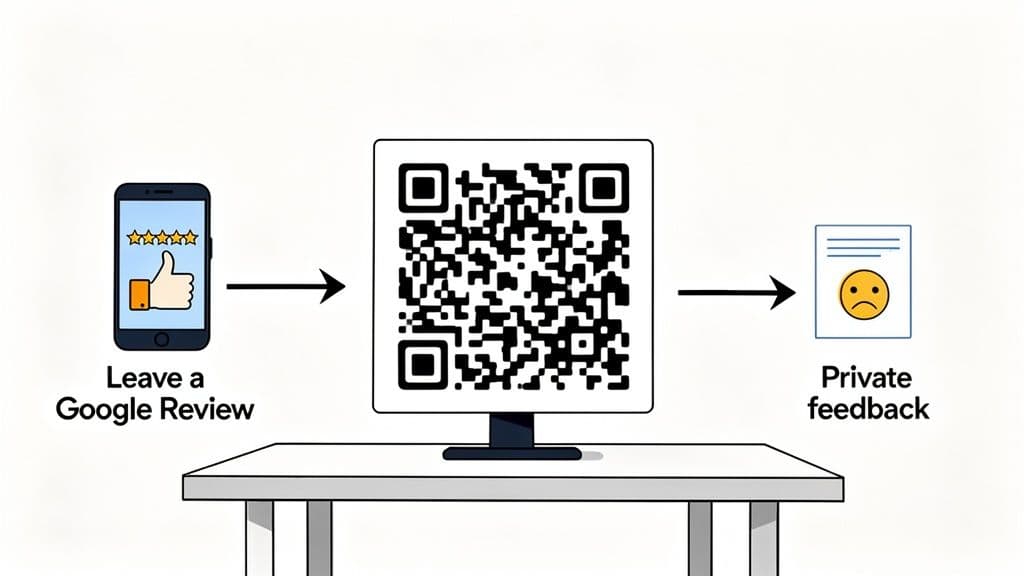
This approach turns a simple feedback request into a strategic reputation management tool. It empowers businesses like local shops, restaurants, and service providers to actively shape their online story by encouraging positive reviews and handling negative feedback privately.
Strategic Breakdown
- Context: Place the QR code at the final point of interaction, when the experience is fresh. This could be at the checkout counter, on receipts, on tabletop displays, or in follow-up emails.
- Call to Action: Keep the language inviting and simple. Phrases like "How Did We Do? Scan to Share," "Leave Us a Review," or "Your Feedback Matters" encourage participation.
- Destination: The QR code links to a simple landing page with a rating prompt (e.g., 1-5 stars). Based on the rating, the user is automatically redirected to either your public Google Reviews page or a private feedback form.
Practical Tip: The magic of this CTA is its ability to filter feedback. By providing an immediate and private channel for complaints, you make unhappy customers feel heard while protecting your public brand from impulsive negative reviews.
Actionable Tips for Implementation
- Use Dynamic QR Codes: This is essential. A dynamic QR code lets you adjust the rating threshold or update the links to your Google Review page and internal form without reprinting anything.
- Brand for Trust: Customize your QR code with your logo and brand colors. A branded code looks more professional and trustworthy, increasing the chances customers will scan it.
- Keep It Simple: The feedback process should be effortless. Aim for a maximum of 2-3 taps from scan to submission. Any friction, like requiring a lengthy login, will dramatically lower your completion rate.
- Respond to All Feedback: Set up alerts for new private feedback so you can respond quickly. Acknowledging and acting on negative feedback can often turn a dissatisfied customer into a loyal one. You can discover how to set up a powerful QR code for Google Reviews with this filtering logic.
3. Promotional Coupon/Discount QR Code (For E-commerce & Retail)
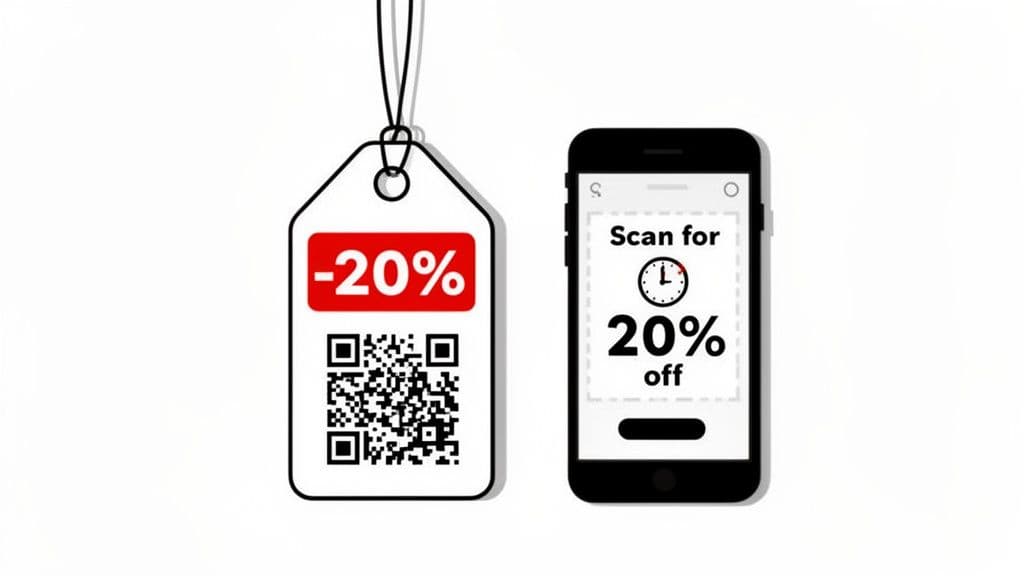
The promotional coupon QR code is a fantastic tool for bridging the gap between your physical and digital storefronts. As one of the most effective qr code call to action examples, it provides an instant incentive for customers to make a purchase. By scanning a code on a product tag, store sign, or flyer, shoppers unlock an exclusive discount on their phone, driving immediate sales.
This strategy taps into the universal desire for a good deal. Instead of clipping paper coupons, customers can access offers with a simple scan. For retailers, this not only boosts sales but also provides valuable data on which promotions are most effective.
Strategic Breakdown
- Context: Place the QR code at key points in the customer journey: in-store signage, at the checkout counter, on direct mailers, or even in email campaigns. The goal is to present the offer when purchase intent is highest.
- Call to Action: The language must be benefit-driven. Phrases like "Scan for 20% Off Your Purchase," "Unlock a Secret Deal," or "Get Your Exclusive Coupon Now" create a clear reason to scan.
- Destination: The QR code should direct users to a mobile-friendly landing page that clearly displays the discount code, a "copy code" button, and simple instructions for use.
Practical Tip: A discount QR code works best when it creates a sense of exclusivity and urgency. The offer should feel like a special reward for taking action, compelling customers to convert immediately.
Actionable Tips for Implementation
- Use Dynamic Codes for Flexibility: A dynamic QR code is crucial here. It allows you to update the discount, change the landing page, or deactivate an expired offer without reprinting your marketing materials. This is perfect for managing seasonal sales.
- Brand for Recognition: Customize your QR code with your brand’s logo and colors. A branded code reinforces your identity and encourages more scans than a generic one.
- Create a Frictionless Process: The landing page must be simple. It should prominently feature the coupon code with a one-click copy button. Don't ask for unnecessary information that could cause customers to give up.
- Track Your ROI: Use the analytics dashboard of a tool like QR Code Maker to monitor scans. Pair this data with your sales system to track coupon redemptions, connecting specific QR code campaigns to actual revenue.
4. Event Check-in & Ticketing QR Code (For Events & Venues)
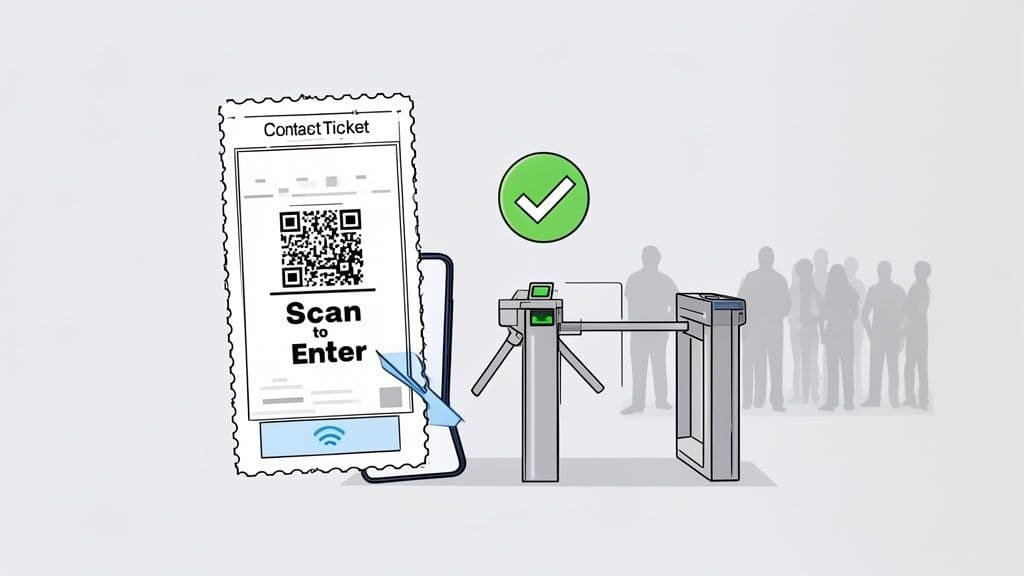
The event check-in and ticketing QR code has revolutionized how venues manage entry, making it one of the most practical qr code call to action examples for organizers. Each digital or printed ticket gets a unique QR code. When attendees arrive, a quick scan validates their ticket and grants entry, drastically reducing lines and streamlining check-in.
This method turns a potential bottleneck into a smooth, data-rich process. It improves security by preventing duplicate tickets and gives organizers live attendance figures. From large music festivals to corporate conferences, this technology ensures a professional first impression.
Strategic Breakdown
- Context: The QR code is the central part of the ticket itself, whether delivered via email, an app, or a printout. It is presented at the main point of entry: the gate, door, or registration desk.
- Call to Action: The instruction is usually implied but often reinforced with simple text like "Scan for Entry," "Your Ticket: Scan Here," or "Have Your QR Code Ready."
- Destination: The QR code contains encrypted ticket data (like a ticket number or attendee name). Scanning it with a specific app checks this data against the event's database to grant or deny access.
Practical Tip: The power of a ticketing QR code is that it merges physical access with digital data. Each scan isn't just an entry; it's a data point that confirms attendance and helps you manage venue capacity in real-time.
Actionable Tips for Implementation
- Prioritize Scanning Reliability: Use a QR code with high error correction. Ensure the printed code is at least 2cm x 2cm and has high contrast (black on white is best) to avoid scanning issues in different lighting.
- Set Up Efficient Scanning Stations: To prevent lines, have multiple check-in points with trained staff. Thoroughly test your scanning hardware and software with different phone models and screen brightness levels before the event.
- Provide Clear Instructions: In your confirmation emails, tell attendees to have their QR code ready. Include a screenshot showing where to find it on their ticket to minimize confusion at the gate.
- Use Analytics for Future Planning: A system that provides scan data is invaluable. Analyzing check-in times can help you optimize staffing for future events, while tracking attendance helps you understand your audience better.
5. Product Information QR Code (For Retail & Manufacturing)
A product information QR code acts as a digital extension of your physical packaging. It's one of the most practical qr code call to action examples for bridging the gap between a product on the shelf and the wealth of information a customer needs to feel confident in their purchase. By placing a QR code on packaging, brands can direct customers to detailed specs, user guides, or origin stories.
This approach empowers customers with on-demand information right at the point of sale. It goes beyond the limited space on a label to offer rich content like setup videos, sustainability reports, or complete ingredient lists, which can influence buying decisions and reduce returns.
Strategic Breakdown
- Context: Place the code directly on the product's packaging, tag, or in-store shelf display. This ensures it's available exactly when a shopper is evaluating the item.
- Call to Action: The language should be clear and benefit-oriented. Phrases like "Scan for Full Specs & Setup Guide," "See Our Sustainability Story," or "View Ingredients & Allergen Info" tell the user what they'll get.
- Destination: The QR code should link to a dedicated, mobile-friendly landing page with detailed technical specs, how-to videos, downloadable manuals, warranty information, and customer reviews.
Practical Tip: This QR code turns a simple package into an interactive experience. It builds trust through transparency and provides value beyond the physical product, satisfying the modern consumer's desire for in-depth information.
Actionable Tips for Implementation
- Use Dynamic QR Codes: This is essential for product information. A dynamic code lets you update the destination URL for new product versions, updated manuals, or promotions without ever changing the code printed on your packaging.
- Optimize the Landing Page for Mobile: The destination must load quickly and be formatted for easy reading on a smartphone. Use collapsible sections, large fonts, and high-quality images or videos.
- Prioritize Key Information: Structure your landing page logically. Place the most important information, like key specs or setup videos, at the top. Use analytics from a platform like QR Code Maker to see what customers access most.
- Brand Your QR Code: Incorporate your logo and brand colors into the QR code to make it recognizable. A branded code feels like an integrated part of the product experience.
- Scale Across Product Lines: If you need codes for dozens or hundreds of SKUs, our Bulk QR Code Generator lets you create them all from a single CSV upload.
6. WiFi Connection QR Code (For Hospitality & Public Spaces)
The WiFi QR code is a customer-friendly tool that turns a common annoyance into a seamless experience. This call to action involves a QR code that, when scanned, automatically connects a user's device to the venue's WiFi network—no more searching for network names or typing in complex passwords. It is one of the most popular qr code call to action examples for enhancing the guest experience in cafes, hotels, and offices.
This QR code offers more than just convenience. You can direct users to a custom landing page before granting access, allowing you to promote special offers, share important information, or simply welcome them to your space.
Strategic Breakdown
- Context: Place the QR code in high-traffic areas where guests are likely to need internet access, such as hotel rooms, coffee shop tables, waiting rooms, and event registration desks.
- Call to Action: The messaging should be straightforward and benefit-driven. Phrases like "Free WiFi Here," "Scan to Connect," or "Get Online Instantly" clearly communicate the value.
- Destination: The QR code contains the WiFi network's name (SSID) and password. When scanned, it prompts the user's phone to join the network automatically.
Practical Tip: The goal is to eliminate friction. A one-scan connection feels like a thoughtful service that significantly improves a visitor's perception of your venue.
Actionable Tips for Implementation
- Use a Dedicated WiFi QR Code Type: This is key. A specific WiFi QR code embeds network credentials directly, enabling the one-scan connection. Linking to a page with the password written on it is far less effective.
- Brand Your Welcome Experience: If you use a landing page, ensure it's fully branded with your logo, colors, and a welcoming message. Use this space to highlight a daily special or an upcoming event.
- Prioritize Security: Be transparent about data collection if you require an email for access. Ensure your guest network is isolated from your main business network to protect sensitive operational data.
- Make It Visible: Place the QR code in multiple, easy-to-see locations. Use tent cards on tables, stickers on windows, or signs at the counter. The goal is effortless access.
Free account includes unlimited static codes + 1 trackable dynamic code
7. Business Card QR Code (For Networking)
The business card QR code (vCard) is a modern networking essential. This simple addition transforms your static, printed card into a dynamic tool that directly integrates with a contact’s phone. A quick scan allows someone to instantly save all your contact details—name, phone number, email, website, and even your photo—to their address book. This is one of the most practical qr code call to action examples for professionals.
It eliminates the manual work of typing in information, reducing the chance of errors and ensuring your details are saved immediately. For anyone who attends conferences, trade shows, or client meetings, it's a powerful way to make a memorable, tech-savvy first impression and make it effortless for new connections to follow up.
Strategic Breakdown
- Context: The QR code is printed directly on your business card, placed where it's easy to see and scan.
- Call to Action: The language is simple and direct. Phrases like "Scan to Save My Contact," "Add Me to Your Contacts," or just a simple icon of a phone or contact card are effective.
- Destination: The QR code contains vCard data. When scanned, it opens the "Add Contact" screen on the user's phone, pre-filled with all your information.
Practical Tip: A vCard QR code shows you value the other person's time. By making it incredibly easy for them to save your details, you increase the likelihood of future communication.
Actionable Tips for Implementation
- Use a Dynamic vCard QR Code: This is a game-changer. It allows you to update your contact information (like a new phone number or job title) at any time without having to reprint hundreds of business cards.
- Keep the Design Clean: Don't overcrowd your business card. Ensure the QR code has enough white space around it for reliable scanning and is at least 2cm x 2cm.
- Brand the QR Code: Add your company logo or a professional headshot to the center of the QR code. This personalization makes it more engaging and reinforces your personal brand.
- Include All Relevant Information: When creating your vCard, include your name, title, company, phone number, email, website, and even your LinkedIn profile link to provide a comprehensive digital introduction.
Your Name
Your Title
Use the full designer for more options like logos, themes, and Bio Link QR codes
8. Social Media & App Download QR Code (For Digital Growth)
This QR code bridges the gap between your physical presence and your digital community. It's one of the most effective qr code call to action examples for growing an online following. It provides a direct, one-scan link to a brand's social media profile or an app store download page, converting offline audiences into online followers and app users.
The main benefit is turning real-world interactions into measurable digital growth. A customer in your cafe can instantly follow you on Instagram, or a shopper can download your loyalty app on the spot. This immediacy removes friction and captures user interest at its peak.
Strategic Breakdown
- Context: Place the QR code in high-visibility physical locations where customers are already engaged: product packaging, in-store signage, receipts, event banners, or restaurant tables.
- Call to Action: The language should be persuasive. Phrases like "Follow Us for Exclusive Content," "Scan to Join Our Community," or "Download Our App for 10% Off" clearly state the action and the incentive.
- Destination: The QR code links directly to a specific social media profile (like Instagram) or the appropriate app store page. A tool like QR Code Maker can even create a single QR code that sends users to the correct app store (Apple or Google) based on their device.
Practical Tip: The value exchange must be clear. Users are more likely to scan if they see a clear benefit, whether it's access to exclusive content, a community connection, or a discount.
Actionable Tips for Implementation
- Use Dynamic QR Codes: This allows you to update the destination link without reprinting your materials. You could promote a TikTok profile one month and an app download the next, all using the same physical QR code.
- Brand and Customize: A QR code leading to a social profile should reflect your brand's style. Use a generator to add your logo and match your brand colors to create a visually appealing code. You can discover how to generate a QR code for Instagram that aligns with your visual identity.
- Offer a Clear Incentive: Don't just ask for a follow; give a reason. "Scan to enter our giveaway" or "Download for exclusive deals" are far more compelling than a simple "Follow Us."
- Optimize the Destination: Ensure your social media profile is complete and engaging, or that your app store page has clear screenshots and positive reviews. A poor landing experience will cause users to abandon the action after scanning.
8 QR Code CTA Use-Case Comparison
| Solution | Implementation complexity | Resource requirements | Expected outcomes | Ideal use cases | Key advantages |
|---|---|---|---|---|---|
| Contactless Menu QR Code (Restaurant & Hospitality) | Low — simple QR + hosted menu; POS sync optional | Hosted mobile menu, internet, basic staff training | Eliminates printed menus; realtime pricing/availability updates; item-view analytics | Restaurants, cafes, bars, hotels | Contactless service, cost savings, easy updates, analytics |
| Google Reviews Redirect QR Code (Reputation Management) | Medium — conditional logic and redirect flows | Rating interface, internal feedback form, analytics, clear signage | Increase positive Google reviews; capture private negative feedback; better local SEO | Retail, restaurants, healthcare, service providers, hotels | Boosts positive ratings, protects reputation, actionable feedback |
| Promotional Coupon/Discount QR Code (E-commerce & Retail) | Medium — dynamic coupons and unique-code management | Coupon generator, POS/e‑commerce integration, redemption tracking | Drives immediate conversions and higher AOV; measurable redemption rates | Retail stores, e‑commerce, restaurants, grocery chains | Creates urgency, precise campaign tracking, omnichannel integration |
| Event Check-in & Ticketing QR Code (Events & Venues) | Medium–High — unique tickets, scanning infrastructure, offline capability | Ticketing integration, scanners/staff, reliable network or offline app | Faster check-in, reduced queues, fraud prevention, attendance analytics | Concerts, conferences, festivals, sports venues, museums | Rapid entry, capacity control, anti‑fraud, real‑time attendance data |
| Product Information & Specifications QR Code (Retail & Manufacturing) | Low–Medium — link maintenance and mobile optimization | Mobile pages/PDFs, product database integration, content upkeep | Reduced returns, better-informed buyers, increased confidence scores | Electronics, consumer goods, cosmetics, food manufacturers, retailers | On‑demand detailed info, updateable content, reduces packaging clutter |
| WiFi Connection QR Code (Hospitality & Public Spaces) | High — network integration, guest portal, privacy compliance | WiFi/router integration, splash pages, CRM/email integration, legal/privacy setup | Frictionless WiFi access, contact capture, location‑based marketing insights | Hotels, cafes, airports, malls, events, co‑working spaces | Simplifies connection, captures leads, enables targeted promotions |
| Business Card QR Code (Networking) | Low — requires a dynamic vCard generator | Professional business card design, contact info management | Instant contact saving, fewer data entry errors, modern impression | Professionals, sales teams, consultants, event attendees | Effortless networking, updateable contact info, enhanced recall |
| Social Media Profile & App Download QR Code (Social & Mobile) | Low — dynamic routing to profiles or app stores | Landing pages, app/store links, tracking, branded design | Increased followers and app downloads; trackable offline→online conversions | Influencers, brands, retail, events, fitness/wellness | Low‑friction growth, measurable results, updateable without reprints |
Putting Your QR Code Strategy into Action
The journey through these diverse qr code call to action examples reveals a powerful truth: a QR code is only as effective as the action it inspires. The difference between a passive square and a dynamic gateway to engagement lies in a well-crafted call to action that is clear, compelling, and relevant to the customer's needs at that moment.
From a restaurant’s "Scan for Today's Specials" to a retailer's "Scan for 20% Off," the most successful QR codes offer an immediate and tangible benefit. They don’t just ask for a scan; they promise a solution or a seamless experience. This value is what drives engagement and turns a simple physical interaction into a measurable digital conversion.
Core Principles for a High-Converting QR Code CTA
To recap the key lessons from our examples, here are the core principles for success:
- Be Specific: Vague CTAs like "Scan Me" don't work. Modern users need to know why they should scan. "Scan to Join Our VIP List" is far more persuasive because it defines the outcome. Always answer the user’s unspoken question: “What’s in it for me?”
- Context is Everything: The physical placement of your QR code is as important as its digital destination. A QR code on a product package should lead to setup guides, while one on a trade show banner should capture leads. The CTA must align with the user's mindset in that exact moment.
- Design Builds Trust: A generic black-and-white QR code can feel impersonal. Incorporating your brand's logo and colors not only looks better but also acts as a visual seal of approval. This simple act of branding reassures users they are interacting with a legitimate source, which significantly boosts scan rates.
From Theory to Tangible Results
The true potential of these strategies is unlocked when you move from planning to implementation. The examples we’ve explored all share a common foundation built on three crucial technical elements:
- Dynamic QR Codes: The ability to change the destination link without reprinting the code is a game-changer. It ensures your campaigns remain flexible, allowing you to update menus, switch offers, or correct a link on the fly.
- Professional Customization: Beyond colors and logos, great tools allow you to create QR codes that are a seamless extension of your brand identity, making them instantly recognizable and more appealing.
- Actionable Analytics: How many people scanned your code? When and where did they scan it? This data is vital for measuring success, A/B testing different calls to action, and proving the ROI of your efforts.
Embracing these principles and technical capabilities is what transforms a QR code from a static image into a powerful marketing asset. It’s time to choose the example that best fits your business goals, craft your compelling call to action, and start measuring the results.
Ready to create professional QR codes that get results? QR Code Maker provides all the tools you need, including dynamic codes, deep brand customization, and real-time analytics. Start building your first high-impact campaign today with a trusted solution designed for marketers and business owners.
Frequently Asked Questions
What is a QR code call to action?
A QR code call to action is a prompt that encourages users to scan a QR code to perform a specific action, such as viewing a menu or leaving a review.
How can I create a dynamic QR code?
You can create a dynamic QR code using various online tools like QR Code Maker, which allows you to change the destination link without needing to reprint the code.
Where should I place my QR codes for maximum engagement?
Place QR codes in high-traffic areas or at points of decision-making, such as tables in restaurants or checkout counters in retail stores, to encourage scanning.
Why is branding important for QR codes?
Branding your QR code with your logo and colors increases trust and recognition, making customers more likely to scan it.
How can I track the effectiveness of my QR code campaigns?
Use the analytics features provided by your QR code generator to monitor scan rates and gather insights on customer interactions and behaviors.
Ready to create your QR code?
Free forever for static codes. Pro features with 14-day trial, no credit card required.

Irina Aguiar
·Content LeadIrina Aguiar leads content strategy at QR Code Maker, where she has written extensively on QR code technology, marketing, and business operations. Her work ranges from technical explainers on how QR codes are generated and how error correction works to practical guides on QR marketing, automation, and scan analytics — plus hands-on tutorials covering Python, Google Sheets, and Zapier integrations. She also publishes honest competitor comparisons and industry-specific playbooks for retail, real estate, hospitality, healthcare, and events.
More from Irina Aguiar →Related Articles
10 Practical QR Code Marketing Strategies for Your Business
Discover 10 actionable qr code marketing strategies to boost engagement and ROI. This guide for SMBs covers everything from analytics to contactless menus.
The 12 Best QR Code Monkey Alternative Tools in 2026
Searching for a QR Code Monkey alternative? Discover the 12 best QR code generators for creating dynamic, branded, and trackable codes for your business.
How to Make and Use Transparent QR Codes for Professional Branding
Learn to design transparent qr codes that blend with your brand, stay scannable, and drive engagement with practical tips and real-world examples.