
Learn what QR codes are, what QR stands for, who invented them, and how they work. A complete guide to understanding the technology behind those square patterns.
A QR code is a two-dimensional barcode that stores information in a pattern of black and white squares. When you scan it with your phone camera, the pattern is decoded into usable data—usually a website link, but sometimes text, contact info, or WiFi credentials.
What Does QR Code Stand For?
QR stands for "Quick Response."
The name perfectly describes what makes QR codes special: they can be read instantly, at high speed, from any angle. Traditional barcodes needed precise alignment and slow, careful scanning. QR codes were designed for the fast-paced world of manufacturing, where every second counts.
The "Quick Response" name wasn't just marketing—it was a technical requirement. On Toyota's assembly lines, workers needed to scan parts in under a second while keeping the production line moving. Hara's team designed the QR code specifically to meet this speed requirement, achieving scan times 10x faster than traditional barcodes.
Who Invented the QR Code?
Masahiro Hara, an engineer at Denso Wave (a Japanese automotive parts company and Toyota subsidiary), invented the QR code in 1994.
The Problem He Was Solving
In the early 1990s, Toyota's manufacturing lines used traditional barcodes to track parts. But there were problems:
- Limited capacity: Barcodes held only about 20 characters
- Slow scanning: Each barcode needed precise alignment
- Multiple codes needed: Complex parts required scanning several barcodes
Hara's team was tasked with creating something better—a code that could hold more data and be scanned quickly from any direction.
The Inspiration
According to Hara, the breakthrough came from an unlikely source: the ancient board game Go. Looking at the game's grid of black and white stones, he realized a two-dimensional pattern could store vastly more information than one-dimensional barcode lines.
The Result
The QR code was born. It could hold 100 times more data than a barcode and be scanned in milliseconds from any angle. What started as an automotive tracking tool would eventually become one of the most ubiquitous technologies in the world.
Timeline: From Factory Floors to Everyday Life
- 1994: Denso Wave invents the QR code for Toyota manufacturing
- 2000: QR code becomes an ISO international standard (ISO/IEC 18004)
- 2002: First camera phones with QR scanning launch in Japan
- 2010: QR codes gain traction in marketing and advertising
- 2011: QR usage peaks in early smartphone era, then plateaus
- 2017: Apple adds native QR scanning to iPhone Camera app
- 2020: COVID-19 drives massive adoption for contactless menus and check-ins
- 2022-Present: QR codes become standard infrastructure for payments, authentication, and information sharing
Denso Wave made a crucial decision: they patented the technology but chose not to enforce the patent, allowing anyone to use QR codes freely. This open approach is a major reason QR codes became so widespread.
Year QR codes were invented
Max alphanumeric characters
Max numeric digits
QR Codes vs. Barcodes: What's the Difference?
The fundamental difference is dimension:
| Feature | Barcode | QR Code |
|---|---|---|
| Dimensions | 1D (horizontal lines) | 2D (square grid) |
| Capacity | ~20 characters | ~4,000+ characters |
| Scanning angle | Must be straight | Works from any angle |
| Error correction | None | Up to 30% damage tolerance |
| Data types | Numbers/text only | URLs, WiFi, contacts, more |
| Speed | Slower | Instant |
Think of it this way: a barcode is like a single line of text. A QR code is like a full paragraph compressed into a square.
For a detailed comparison, see our guide on QR codes vs. barcodes.
How QR Codes Work
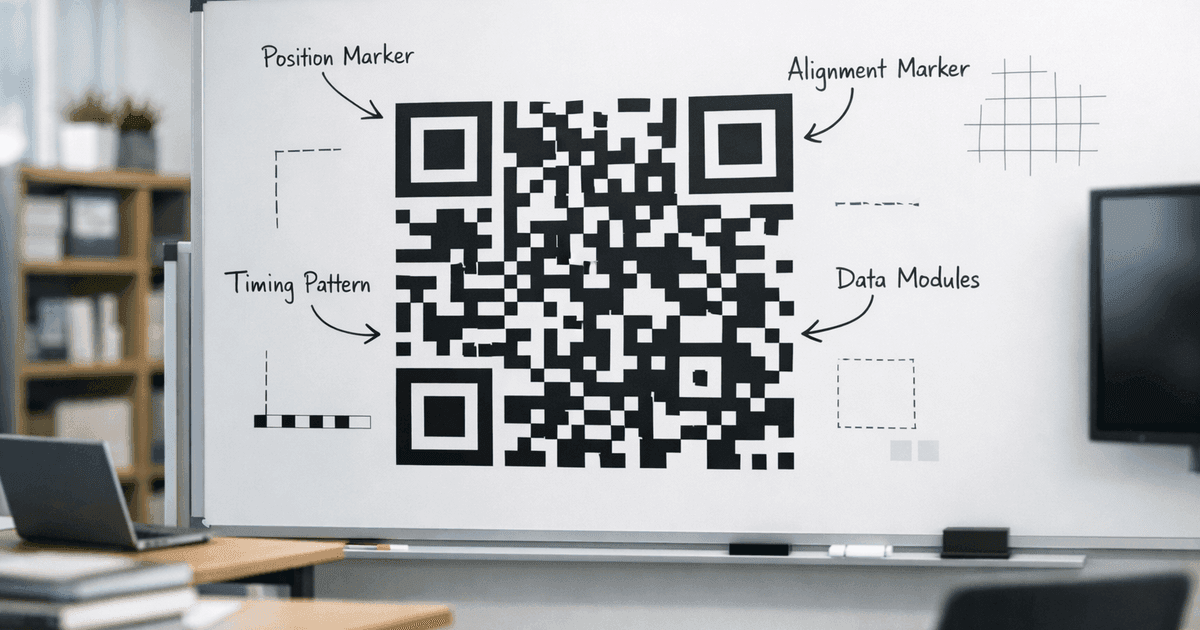
Every QR code contains the same basic elements that work together to make scanning reliable:
1. Finder Patterns (The Three Big Squares)
The three large squares in the corners tell scanners "this is a QR code" and establish orientation. No matter how you rotate your phone, these squares let the scanner figure out which way is up.
2. Timing Patterns
The alternating black-and-white lines connecting the corners establish the grid size and spacing.
3. Data Area
The rest of the pattern—the seemingly random arrangement of squares—contains your actual encoded data plus backup information for error correction.
4. Error Correction
Here's what makes QR codes remarkably robust: they include redundant data that allows reconstruction even when part of the code is damaged. You can cover up to 30% of a QR code and it will still scan.
For a deeper technical dive, read How QR Codes Work.
QR Code Versions and Sizes
QR codes come in 40 different "versions," ranging from Version 1 (21×21 modules) to Version 40 (177×177 modules). The version determines how much data the code can store:
| Version | Size (modules) | Max Alphanumeric Characters |
|---|---|---|
| Version 1 | 21×21 | 25 |
| Version 10 | 57×57 | 395 |
| Version 20 | 97×97 | 1,249 |
| Version 40 | 177×177 | 4,296 |
Most everyday QR codes (URLs, WiFi passwords) use Versions 1-10. Higher versions are reserved for encoding large amounts of data like long text passages or detailed vCard information.
Error Correction Levels
QR codes offer four error correction levels, each trading capacity for resilience:
- Level L (Low): Recovers up to 7% damage—maximum data capacity
- Level M (Medium): Recovers up to 15% damage—good balance
- Level Q (Quartile): Recovers up to 25% damage—more robust
- Level H (High): Recovers up to 30% damage—best for printed materials or codes with logos
If you're adding a logo to your QR code, use Level H error correction. The logo essentially "damages" part of the code, and high error correction ensures it still scans reliably.
QR Codes vs. Other 2D Barcodes
QR codes aren't the only two-dimensional barcode format. Here's how they compare to alternatives:
Data Matrix
Data Matrix codes are smaller and encode less data (about 2,335 alphanumeric characters max). They're popular for tiny components in electronics manufacturing because they can be printed at very small sizes. However, they lack QR codes' error correction robustness.
PDF417
PDF417 (used on driver's licenses and shipping labels) is technically a "stacked linear" barcode rather than a true 2D code. It holds less data than QR codes and requires a specific scanning orientation.
Aztec Code
Aztec codes (used on airline boarding passes) have a distinctive bullseye center pattern. They're comparable to QR codes in capacity but less widely recognized by consumers.
Why QR won: QR codes struck the best balance of capacity, error correction, scanning speed, and ease of recognition. The three distinctive corner squares make them instantly identifiable, even to people who've never heard the term "QR code."
What Can QR Codes Store?
QR codes can encode several types of data:
Website URLs
The most common use. Scan the code, open the website.
https://example.com
WiFi Credentials
Instantly connect to a network without typing the password.
WIFI:T:WPA;S:NetworkName;P:password;;
Contact Information (vCard)
Save a contact to your phone with one scan.
BEGIN:VCARD
VERSION:3.0
N:Smith;John
TEL:+1234567890
END:VCARD
Plain Text
Just display a message—no internet required.
Email Links
Open an email with pre-filled recipient, subject, and body.
Phone Numbers
Dial a number with one tap after scanning.
App Store Links
Jump directly to an app download page.
Static vs. Dynamic QR Codes
Not all QR codes work the same way:
Static QR Codes
Encode the data directly into the pattern.
- ✓ Work forever (no external dependencies)
- ✓ Usually free to create
- ✗ Cannot be updated after creation
- ✗ No scan tracking
Dynamic QR Codes
Encode a short redirect URL that you control.
- ✓ Change destination anytime
- ✓ Track scans (location, time, device)
- ✓ Keep patterns simple (better for small prints)
- ✗ Require an active service to work
For most business uses, dynamic codes are the better choice because you can fix mistakes and measure performance without reprinting.
Learn more: Static vs. Dynamic QR Codes
Why QR Codes Became Popular
QR codes existed for decades before becoming mainstream. What changed?
The Smartphone Revolution
When iPhones and Android phones added native QR scanning (no app required), the friction disappeared. Everyone suddenly had a scanner in their pocket.
The Pandemic Acceleration
COVID-19 made contactless interactions essential. Restaurants replaced physical menus with QR codes. Businesses adopted touchless check-ins. Usage skyrocketed.
Better Design Options
Early QR codes were ugly black-and-white squares. Modern generators let you add colors, logos, and custom designs that match your brand while remaining scannable.
Common Uses for QR Codes Today
QR codes appear everywhere because they solve real problems:
Restaurants and Hospitality
Digital menus that update instantly without reprinting. Restaurants can change prices, add seasonal items, and update allergen information in real-time. Many establishments now use QR codes for ordering and payment, reducing wait times and staffing needs.
Events and Entertainment
Concert venues, conferences, and museums use QR codes for ticketing, registration, and information access. Attendees scan their tickets for entry, access event schedules, and get background information on exhibits—all without paper.
Payments and Banking
In China, QR code payments through WeChat Pay and Alipay process billions of transactions daily. The technology is spreading globally, with services like Venmo and PayPal adopting QR payments. Some countries are implementing QR-based national payment systems.
Marketing and Advertising
Print materials—billboards, magazine ads, product packaging—link to digital experiences through QR codes. This bridges the gap between physical and digital marketing, enabling tracking and interactive content.
Networking and Business
Digital business cards encoded as QR codes never run out and always contain current information. Professionals share contact details with a scan rather than exchanging paper cards.
Retail and E-commerce
Product packaging includes QR codes linking to authenticity verification, detailed specifications, usage instructions, and customer reviews. This is particularly valuable for luxury goods where counterfeiting is a concern.
WiFi and Connectivity
Guest network access without sharing passwords verbally or on sticky notes. Hotels, cafes, and offices provide QR codes for instant connection to their networks.
Healthcare
Patient identification, medication tracking, and appointment scheduling increasingly rely on QR codes. Some vaccination certificates and health passes use QR codes for verification.
Education
Textbooks and learning materials use QR codes to link to supplementary videos, interactive exercises, and updated information. Museums and historical sites provide detailed explanations through QR-linked audio guides.
QR Code Design: What Makes Them Scannable
Not all QR codes are created equal. Design choices affect scannability:
Size Requirements
The minimum recommended size is 2cm × 2cm (about 0.8 inches) for codes scanned from handheld distance. For posters and signage, use the 10:1 rule: divide the expected scanning distance by 10 to get the minimum code width.
Color and Contrast
QR codes need high contrast between the dark modules and light background. While black-on-white is most reliable, you can use colors if:
- Dark modules are at least 40% darker than the background
- You avoid red and green combinations (colorblindness consideration)
- The pattern remains consistent (avoid gradients within modules)
Quiet Zone
Every QR code needs a white border (the "quiet zone") around it—at least 4 modules wide. This buffer helps scanners distinguish the code from surrounding content.
Logo Placement
You can add a logo to the center of a QR code, but keep it under 10% of the total code area and use Level H error correction. The logo should have clean edges and not bleed into the surrounding modules.
Testing Before Printing
Always test your QR code on multiple devices and scanning apps before printing thousands of copies. What scans perfectly on one phone might fail on another if the design pushes the limits.
Frequently Asked Questions
What does QR stand for?
QR stands for "Quick Response." The name reflects the code's main advantage: it can be scanned and decoded almost instantly—much faster than a traditional barcode.
Who invented the QR code?
Masahiro Hara and his team at Denso Wave, a Japanese company (a Toyota subsidiary), invented the QR code in 1994. It was created to track vehicle parts during manufacturing and later became a universal tool for sharing information.
When was the QR code invented?
The QR code was invented in 1994 by Denso Wave. It was designed to track automotive parts on assembly lines but became widely used for marketing and consumer applications in the 2010s.
What information can a QR code store?
A QR code can store up to 4,296 alphanumeric characters or 7,089 numeric digits. That covers website URLs, plain text, WiFi credentials, contact details, email addresses, phone numbers, and more.
Are QR codes the same as barcodes?
No. Barcodes are one-dimensional—they store data in horizontal lines and hold about 20 characters. QR codes are two-dimensional, storing data in a grid that can hold over 4,000 characters and is readable from any angle.
Why are QR codes square?
The square shape lets data be encoded in two dimensions—horizontal and vertical—which dramatically increases capacity compared with a linear barcode. The grid layout was reportedly inspired by the board game Go.
Create Your First QR Code
Now that you understand what QR codes are and how they work, try creating one. For a more comprehensive walkthrough, see our getting started with QR codes guide.
Free account includes unlimited static codes + 1 trackable dynamic code
Popular QR code types:
- URL QR Code – Link to any website
- WiFi QR Code – Share network access
- vCard QR Code – Digital contact cards
- Email QR Code – Pre-filled email links
- PDF QR Code – Share documents
All static codes are free. Dynamic codes with tracking start at our Pro tier.
Using ChatGPT? You can also generate QR codes without leaving a conversation — see our ChatGPT app for the same styling engine inside any chat.
Ready to create your QR code?
Free forever for static codes. Pro features with 14-day trial, no credit card required.

Irina Aguiar
·Content LeadIrina Aguiar leads content strategy at QR Code Maker, where she has written extensively on QR code technology, marketing, and business operations. Her work ranges from technical explainers on how QR codes are generated and how error correction works to practical guides on QR marketing, automation, and scan analytics — plus hands-on tutorials covering Python, Google Sheets, and Zapier integrations. She also publishes honest competitor comparisons and industry-specific playbooks for retail, real estate, hospitality, healthcare, and events.
More from Irina Aguiar →Related Articles
LinkedIn QR Code: Share Your Profile Instantly (2026 Guide)
Create a LinkedIn QR code to share your profile, company page, or post with one scan. Step-by-step guide with design tips, placement ideas, and tracking.
YouTube QR Code: Link Videos to the Physical World (2026 Guide)
Create a YouTube QR code that links to a video, channel, or playlist. Step-by-step guide with use cases for packaging, events, education, and marketing.
QR Code A/B Testing: How to Test What Actually Works
Most guides say print two QR codes and compare. Here's what they don't tell you about costs, statistical significance, and why one-code testing changes everything.