Kripto Para QR Kodları
Bitcoin, Ethereum ve Litecoin için kripto cüzdan QR kodu oluşturun. Müşteriler tarayarak ödeme gönderir — uzun adresleri yazma veya yapıştırma hatasını önleyin.
Kripto Para QR kodları, müşterilerin kolayca ödeme gönderebilmesi için cüzdan adresinizi kodlar. Uzun adresleri yazmaya gerek yok, kopyala-yapıştır hataları yok—sadece tarayın ve ödeyin.
Ne İşe Yarar
Birisi taradığında, kripto cüzdan uygulaması adresiniz önceden doldurulmuş olarak açılır. Tutarı onaylar ve gönderirler. QR kodlarını destekleyen herhangi bir cüzdan uygulamasıyla çalışır (neredeyse hepsi).
Desteklenen Kripto Paralar
- Bitcoin (BTC): Orijinal kripto para
- Ethereum (ETH): Akıllı sözleşmeler ve NFT'ler için popüler
- Litecoin (LTC): Daha hızlı Bitcoin alternatifi
- Bitcoin Cash (BCH): Daha büyük bloklara sahip Bitcoin fork'u
- Dash (DASH): Gizlilik odaklı kripto para
Her biri kendi adres formatını ve URI şemasını kullanır, bu nedenle kodunuzu oluştururken doğru olanı seçin.
Kripto QR Kodu Oluşturma
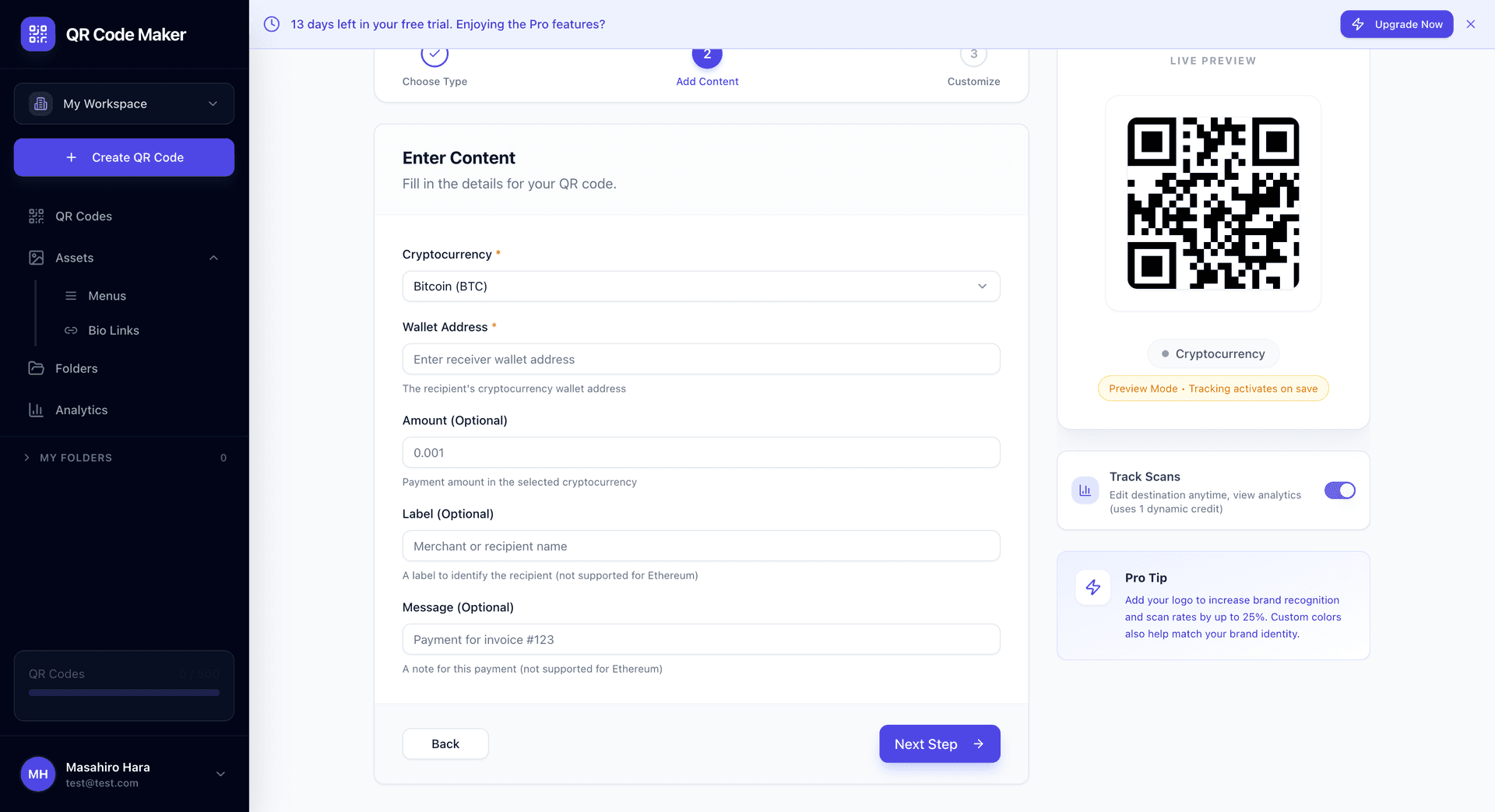
Adım 1: + QR Kodu Oluştur'a tıklayın ve Kripto Para'yı seçin.
Adım 2: Açılır menüden kripto paranızı seçin.
Adım 3: Cüzdan adresinizi girin. Formatı otomatik olarak doğrularız.
Adım 4: İsteğe bağlı olarak talep edilen tutar ve mesaj ekleyin.
Adım 5: QR kod tasarımınızı özelleştirin ve indirin.
Adresinizi İki Kez Kontrol Edin
Kripto işlemleri geri alınamaz. Yanlış adres girerseniz, ödemeler sonsuza kadar kaybolur. Cüzdan uygulamanızdan kopyala-yapıştır yapın ve kodu oluşturmadan önce doğrulayın.
İsteğe Bağlı Alanlar
Tutar: Bir ödeme tutarını önceden doldurun. Sabit fiyatlı ürünler veya önerilen tutarlarla bağışlar için kullanışlıdır.
Etiket: Gönderenin cüzdanında görüntülenen kısa bir etiket (işletme adınız gibi).
Mesaj: İşleme eşlik eden bir not. Fatura numaraları veya sipariş referansları için kullanışlıdır.
Kripto QR Kodlarının Kullanım Yerleri
Perakende kasası: Satış noktanızda kripto ödemelerini kabul edin.
Faturalar: Kripto kabul eden faturalara bir ödeme QR kodu ekleyin.
Bağış sayfaları: Kripto para bağışlarını kabul eden kar amacı gütmeyen kuruluşlar.
Bahşiş: Bahşiş kabul eden müzisyenler, içerik yaratıcıları, hizmet sağlayıcılar.
E-ticaret: Paket fişlerine veya sipariş onaylarına yazdırın.
Etkinlikler: Konferans ürünleri, sanat sergisi satın alımları, popup mağazalar.
Teknik Olarak Nasıl Çalışır
Kripto QR kodları standartlaştırılmış URI formatları kullanır:
- Bitcoin:
bitcoin:<adres>?amount=<tutar>&label=<etiket>&message=<mesaj> - Ethereum:
ethereum:<adres>?value=<tutar> - Diğerleri benzer modelleri takip eder
Bu URI'ler cüzdan uygulamaları tarafından tanınır ve uygun ödeme akışını tetikler.
Statik QR Kodu
Kripto QR kodları statiktir—cüzdan adresi doğrudan desende kodlanır. Bu şu anlama gelir:
- Oluşturulduktan sonra düzenlenemez
- Tarama izleme yok (ödemeleri de görmeyiz—bu blockchain'de)
- Tarama için çevrimdışı çalışır (ödeme hala internet gerektirir)
- Kalıcı: Kod, cüzdan adresi var olduğu sürece geçerlidir
Farklı ürünler için farklı adresler veya izlemeye ihtiyacınız varsa, her biri için ayrı QR kodları oluşturun.
Güvenlik Değerlendirmeleri
Önce küçük bir tutarla test edin. Üretimde kullanmadan önce ödemelerin cüzdanınıza ulaştığını doğrulayın.
Özel alıcı adresleri kullanın. Bazı cüzdanlar her işlem için yeni adresler oluşturur—QR kodları için stabil bir adres kullanın.
Cüzdanınızı izleyin. Gelen işlemler için bildirimler ayarlayın.
Volatiliteyi düşünün. Kripto değerleri dalgalanır. Belirli bir fiat tutara ihtiyacınız varsa, fiyatlar değiştikçe QR kodlarınızı güncelleyin—veya dönüşümü işleyen bir ödeme işlemcisi kullanın.
İpuçları
Birden fazla seçenek görüntüleyin. Hem Bitcoin hem de Ethereum kabul ediyorsanız, her biri için kodlar oluşturun ve birlikte görüntüleyin.
Dönüşüm rehberliği ekleyin. "Ödeme: 0.002 BTC (yaklaşık $60 USD)" fiat ile düşünen müşterilere yardımcı olur.
Süreci açıklayın. Birçok insan daha önce kripto ile ödeme yapmadı. Kısa bir "Cüzdan uygulamanızla tarayın" talimatı yardımcı olur.
Yüksek kontrast tasarımlar kullanın. Kripto QR kodları genellikle çeşitli aydınlatma koşullarında cüzdan uygulamalarından taranır.
Sık Sorulan Sorular
Yazdırdıktan sonra adresi değiştirebilir miyim? Hayır. Kripto QR kodları statiktir. Adresiniz değişirse yeni bir kod oluşturun.
Cüzdanım neden taramıyor? Doğru kripto para türünü seçtiğinizden emin olun. Bir Bitcoin adresi bir Ethereum cüzdanıyla çalışmaz.
Kimin ödeme yaptığını görebilir miyim? Cüzdanınızda gelen işlemleri görürsünüz. İş kullanımı için, ödemeleri siparişlerle eşleştirmek için mesaj alanına bir referans ekleyin.
Bir ücret alıyor musunuz? Almıyoruz—sadece QR kodunu oluşturuyoruz. Gönderirken standart blockchain işlem ücretleri uygulanır, gönderen tarafından ödenir.
Stablecoin'ler ne olacak? Şu anda yukarıda listelenen kripto paraları destekliyoruz. USDC, USDT ve diğer token'lar henüz desteklenmiyor.
Para birimime otomatik dönüştürebilir miyim? Bu, BitPay veya Coinbase Commerce gibi kripto ödeme işlemcileri tarafından işlenir, QR kodunun kendisi tarafından değil.