Coupon QR Codes
Create a coupon QR code with your discount, promo code, and expiry date. Track redemptions in real time and update the offer without reprinting. Free trial.
Coupon QR codes create a digital discount offer that customers can scan and redeem. Track redemptions, set expiration dates, and update offers without reprinting.
What It Does
When someone scans, they see a coupon page with your offer: discount description, promo code, expiration date, and redemption instructions. They show this at checkout or enter the code online.
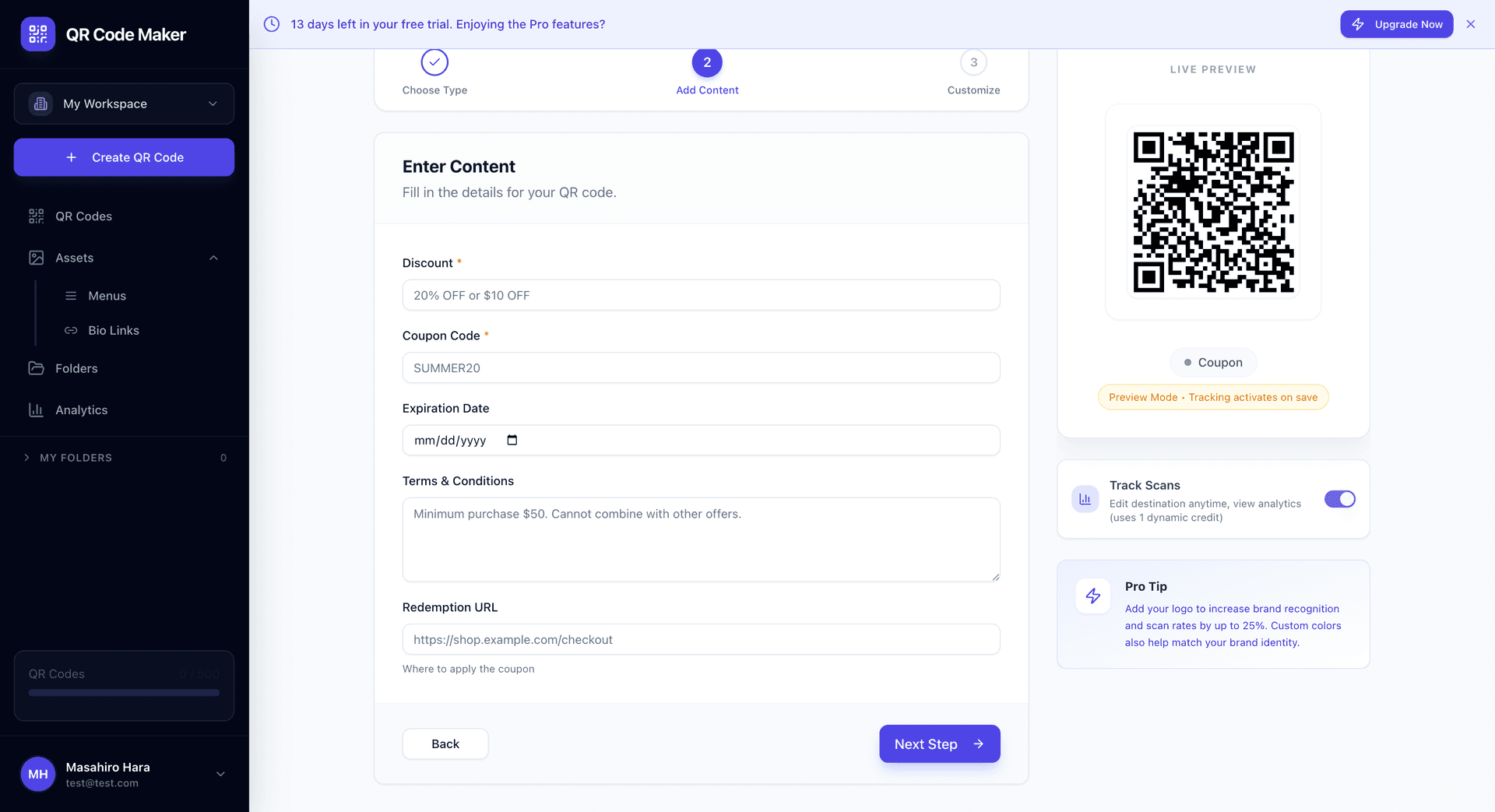
What You Can Include
Offer title: The headline, like "20% Off Your Order" or "Free Shipping This Weekend"
Discount description: Details about the offer, what's included, minimum purchase if any
Coupon code: The promo code customers enter or show at checkout
Expiration date: When the offer ends—creates urgency
Terms & conditions: Fine print, exclusions, limitations
Redemption URL: Optional link to your store or checkout page
Creating a Coupon QR Code
Step 1: Click + Create QR Code and select Coupon.
Step 2: Fill in your offer details: title, description, code, and expiration.
Step 3: Add terms and conditions if needed.
Step 4: Customize your QR code design and download.
Update Without Reprinting
Extend the expiration? Change the discount amount? Edit the coupon in your dashboard—all existing QR codes update automatically.
Use Cases
Retail promotions: In-store signs, window displays, receipt promo codes.
Restaurant specials: Table tents, takeout bags, door hangers.
Direct mail: Postcards, flyers, catalogs with scannable offers.
Event marketing: Trade show giveaways, conference swag, sponsor offers.
Product packaging: Inside-the-box coupons for repeat purchases.
Social proof: "Share for a discount" campaigns.
The Customer Experience
- Customer scans the QR code
- Sees your offer page with all details
- Either shows their phone at checkout (in-person) or copies the code (online)
- Gets their discount applied
- You see the scan in your analytics
Dynamic and Trackable
Coupon QR codes are dynamic, which means:
- Track scans: See how many people scanned your coupon
- Update offers: Change the discount or extend the deadline anytime
- Expire gracefully: After expiration, show a "Sorry, this offer has ended" message
- A/B test: Create variations and see which performs better
Campaign Tracking
Use unique coupon codes for each campaign to track redemption:
| Campaign | Code | Track |
|---|---|---|
| In-store signs | INSTORE20 | In-store conversions |
| Direct mail | MAIL20 | Mail piece effectiveness |
| Social media | SOCIAL20 | Social campaign ROI |
When customers use these codes, you can attribute the sale to the right marketing channel.
Running promotions across multiple locations? Use our Bulk QR Code Generator to create unique coupon codes for each store or channel in one batch.
Design Tips
Make the discount prominent. "20% OFF" should be the first thing people see when they scan.
Create urgency. "Valid through December 31" or "This weekend only" motivates action.
Keep terms visible. Don't hide important limitations in tiny print—that frustrates customers.
Include redemption instructions. "Show this screen at checkout" or "Enter code at checkout."
Coupon QR vs Discount Codes
| Feature | Coupon QR | Just a Code |
|---|---|---|
| Scan tracking | Yes | No |
| Visual appeal | Full branded page | Text only |
| Updateable | Yes | No |
| Expiration display | Automatic | Manual |
| Mobile-friendly | Optimized page | Customer types code |
Coupon QR codes add a layer of engagement and tracking that bare discount codes can't provide.
Tips
Test redemption workflow. Scan your own coupon, go through checkout, verify the code works.
Train your staff. If used in-store, make sure employees know to look for the coupon screen.
Set realistic expirations. Too short frustrates; too long loses urgency.
Track and analyze. Which locations/channels drive the most scans? Double down on what works.
Common Questions
Can I limit total redemptions? Set limitations in your POS or e-commerce system. The coupon code itself handles quantity limits.
What happens after expiration? Customers see a friendly "This offer has expired" message with an option to visit your website.
Can I create single-use codes? Each QR code uses one coupon code. For true single-use, you'd need unique codes per customer, which is better handled by your e-commerce platform.
Can I see who redeemed? QR analytics show scans. Redemption tracking happens in your POS or e-commerce system when the code is used.
How do I prevent fraud? Use unique codes, set sensible limits in your checkout system, and monitor for unusual patterns.
Can I make the coupon shareable? Yes—the QR code and coupon page can both be shared. This can be good (viral spread) or bad (uncontrolled discounts). Design your offer accordingly.