Discover how to create a QR code for restaurant menu that elevates the dining experience. Learn to design, implement, and track your digital menu.
At its core, a qr code for restaurant menu is a scannable digital barcode. Customers point their phone’s camera at it, and your menu pops up instantly. This simple piece of tech replaces physical menus, saving you money on printing costs and allowing you to make updates on the fly for a cleaner, touch-free dining experience.
Why Smart Restaurants Are Embracing QR Code Menus
Remember when QR codes on tables felt like a temporary pandemic fix? Those days are long gone. Today, they're a strategic tool that savvy restaurant owners use to streamline operations, cut costs, and improve the guest experience. The initial push may have been about health and safety, but the lasting benefits have cemented their place in modern dining.
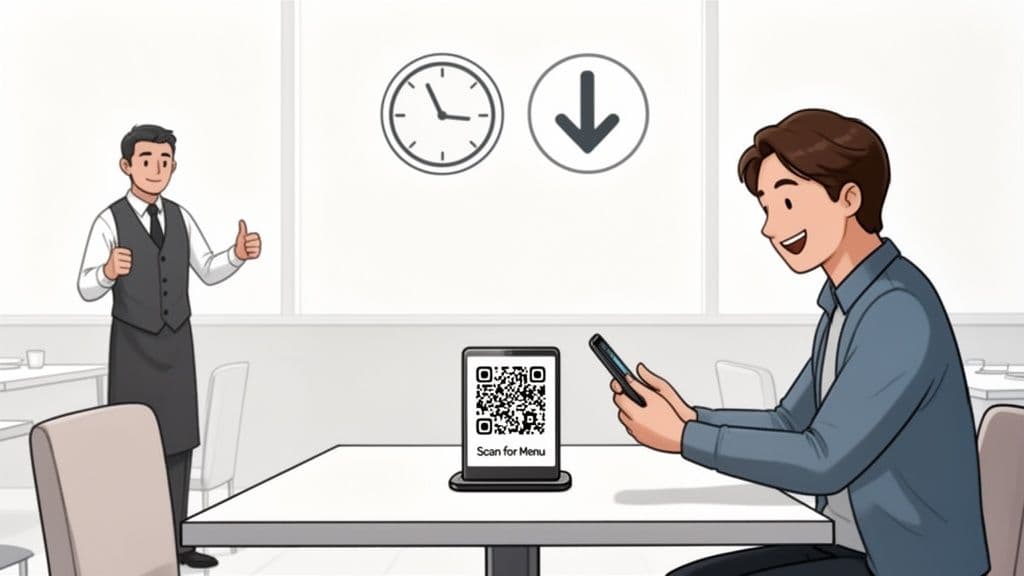
The biggest win is operational agility. Picture this: it’s a packed Friday night, and you just sold the last of your signature salmon special. Instead of having servers awkwardly break the bad news to multiple tables, you can mark the item as "sold out" on your digital menu in seconds. The QR code on the table stays the same, but the menu it points to is always up-to-the-minute.
Boosting Efficiency and Reducing Costs
Every small business owner knows printing costs can be a recurring headache. Menus get sticky, torn, or become instantly obsolete with a single price change. A qr code for restaurant menu eliminates that expense entirely.
But it’s about more than just saving money on paper. A dynamic QR code gives you incredible flexibility.
- Update Items Instantly: Add a daily special, mark a dish as sold out, or adjust prices on the fly. No need to call a graphic designer or wait for the print shop.
- Lighten Staff Workload: Your servers can stop running menus back and forth and focus on what they do best: providing great hospitality and taking orders.
- Promote High-Margin Items: Have a new cocktail or a profitable special you want to push? Feature it right at the top of your digital menu where no one can miss it.
Enhancing the Customer Experience
A well-designed QR code menu puts your guests in control. They can pull up the menu the moment they sit down, browsing at their own pace without having to flag down a server. It's a small change that empowers your customers and often leads to faster decision-making and better table turnover.
For restaurant owners, this isn't just about technology; it's about hospitality. A seamless digital menu shows you respect your customers' time and are invested in providing a modern, frustration-free experience.
This move toward digital integration is a key part of where the industry is heading. If you want to see the bigger picture, check out the 10 Key Food Service Industry Trends for 2025, which are full of similar tech-driven shifts focused on efficiency and guest satisfaction. By adopting a QR code menu, you're not just solving a problem—you're future-proofing your business.
Designing a Digital Menu That Actually Works on Mobile
Before anyone scans your QR code, your digital menu needs to be ready for its close-up. Let’s be honest, a clunky, hard-to-read menu on a smartphone can ruin the dining experience before it even begins. Here is some practical, actionable advice for creating a mobile menu that's both elegant and easy to use.
The first big decision is the menu's format. For years, the default move was to link a QR code to a PDF of the print menu. It's an easy solution, but it often creates a terrible user experience. Customers are forced to pinch, zoom, and scroll endlessly just to find the drinks list. It’s the digital equivalent of trying to read a giant, foldable map in a closet.
PDF Menu vs Interactive Digital Menu Page
A much better option is an interactive menu page—a mobile-optimized webpage designed specifically for easy browsing on a smartphone. This format lays out your menu in a clean, scrollable list with clickable categories, beautiful photos, and detailed descriptions that don’t require any awkward finger gymnastics.
Practical Tip: Your goal is to reduce friction. A customer sitting at your table shouldn't have to work to give you their money. An interactive menu makes ordering feel natural and effortless, not like a chore.
So, what's the real difference between just uploading a PDF and building an interactive menu page? Here's a quick breakdown to help you decide what's right for your business.
| Feature | Hosted PDF Menu | Interactive Menu Page (e.g., using QR Code Maker) |
|---|---|---|
| User Experience | Often requires pinching and zooming. Text can be difficult to read on smaller screens. | Fully optimized for mobile. Easy to scroll, tap, and read with no zooming needed. |
| Loading Speed | Can be slow, especially if the PDF is large or full of high-resolution images. | Loads instantly. It's a lightweight webpage built for speed. |
| Interactivity | Completely static. It's just a digital version of a paper menu. | Allows for clickable categories, expandable item descriptions, and photo galleries. |
| Updating | A hassle. You have to edit the source file, export a new PDF, and re-upload it. | Simple and fast. You can make edits directly in a dashboard, and the menu updates instantly. |
| Visual Appeal | Stuck with the print design, which rarely translates well to a vertical screen. | Designed for visual storytelling with plenty of space for mouth-watering photos. |
Ultimately, an interactive menu page is built for the device your customers are actually using, making it a clear winner for both the guest experience and your bottom line.
Structuring Your Menu for Easy Browsing
Once you’ve committed to an interactive format, organization is key. A hungry customer doesn’t want to hunt for the appetizers or scroll past every entrée just to find the beer list. You need to structure your digital menu logically, just like a physical one.
Start with clear, concise categories that customers can tap to jump directly to a section.
- Logical Grouping: Stick with familiar headings like "Appetizers," "Soups & Salads," "Main Courses," "Desserts," and "Beverages."
- Keep It Simple: Now is not the time for overly clever category names. Clarity beats creativity every time in menu design.
- Highlight Specials: Create a dedicated "Today's Specials" or "Chef's Features" section right at the top. It's the first thing people will see.
This kind of clean structure lets diners find exactly what they’re looking for in seconds. For a more detailed guide, our post on restaurant digital menu software walks you through building these pages step-by-step.
Optimizing Images and Descriptions
An interactive menu page gives you a huge advantage over a static PDF: the ability to use stunning visuals. It's a known fact that high-quality photos can increase sales of specific items by as much as 30%. But there's a catch—large image files can slow your menu's loading time to a crawl.
You must optimize your images for the web before uploading them. Aim for the perfect balance between quality and file size, so they look crisp without taking forever to load. This is where a dedicated tool shines; platforms like QR Code Maker often handle this optimization for you automatically. You upload your beautiful photos, and the system ensures they are web-ready.
Pair those images with compelling descriptions that make each dish sound irresistible, and you’ll turn menu browsers into happy, paying customers.
How to Create and Brand Your Menu QR Code
Alright, your digital menu is looking sharp. Now comes the practical part: creating the QR code that gets your customers there. This bridges the gap from a digital file to a functional tool on your tables. The process is quick, but a few smart choices here will make a huge difference in how professional and effective the experience feels for your guests.
First, you have to decide between a static and a dynamic QR code. This is the single most important decision you'll make in this process, and for a restaurant, there's only one right answer.
A static QR code permanently embeds a URL into its pattern. If you need to change that link—perhaps to launch a new seasonal menu or fix a typo—you have to generate a completely new QR code and reprint everything. For a dynamic business like a restaurant, that's a dealbreaker.
Why Dynamic QR Codes Are a Must for Restaurants
A dynamic QR code is the only way to go. Instead of embedding your menu's URL directly, it points to a short, intermediary link that you control. That small difference gives you incredible flexibility. You can update the final destination link anytime you want, without ever touching the printed QR code on your tables.
With a dynamic qr code for restaurant menu, you can:
- Update Menus Instantly: Switch from the lunch to the dinner menu, run a surprise happy hour special, or link to a holiday menu—all from a simple dashboard, in real-time.
- Correct Mistakes Effortlessly: Realized you linked to the wrong menu? No need to panic or start reprinting. Just log in, paste the correct URL, and you're done. It's a two-second fix.
- Gather Valuable Scan Data: Dynamic codes let you see how many people are scanning your menu, what times are busiest, and even from which devices. This data is gold for understanding your customers.
Simply put, a dynamic code future-proofs your entire system. You print it once and manage it forever.
Generating Your QR Code in a Few Clicks
Creating your code should be painless. Using a purpose-built tool like QR Code Maker, you can generate a high-quality, dynamic code in less than a minute. The platform is designed for business owners, not tech experts, so there's no steep learning curve.
The interface walks you through each step, ensuring your menu details are linked correctly.
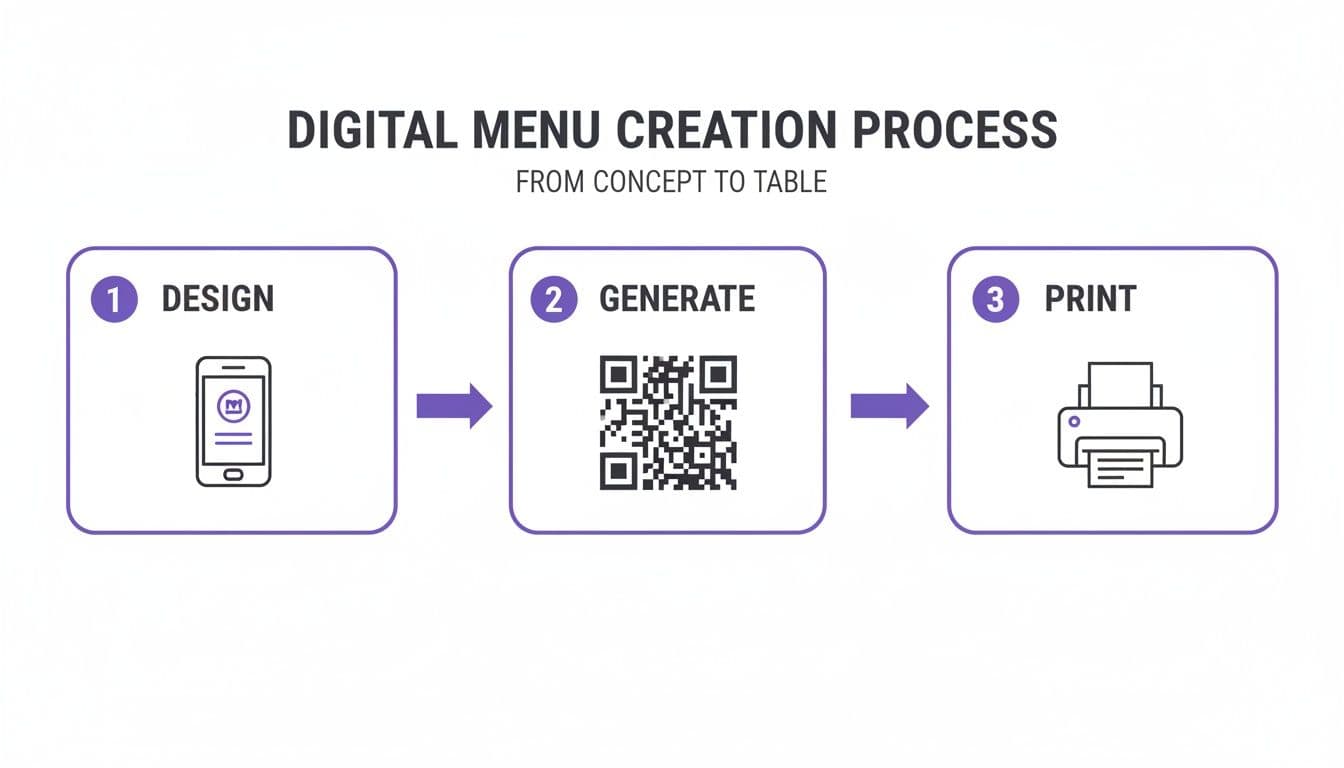
It’s a simple flow: create the mobile-friendly menu, generate a branded QR code pointing to it, and get it ready for printing.
Branding Your QR Code for Trust and Engagement
A generic black-and-white QR code gets the job done, but it does nothing for your brand. Worse, it can feel like a cold, generic piece of tech on an otherwise carefully curated table. Customers are far more likely to scan a code that looks professional and feels like it belongs in your restaurant.
This is where a little customization goes a long way. Don't just accept the default design—make it yours.
Best Practice: Think of your QR code as a tiny digital doorway. A generic one feels like a service entrance. A branded one with your logo and colors is a welcoming front door that invites guests inside.
Here are the essential steps for making your QR code an extension of your brand:
- Add Your Logo: Placing your restaurant's logo in the center of the code is the fastest way to build trust. It instantly tells customers who the code belongs to and that it’s safe to scan.
- Use Your Brand Colors: Swap out the default black for colors from your restaurant's palette. Just make sure you maintain high contrast between the dark pattern of the code and the light background. A dark pattern on a light background is always the safest bet for scannability.
- Choose a Frame: A simple frame helps the code stand out and gives you a spot for a clear call to action.
- Include a Call to Action (CTA): This is critical. Never assume people know what a QR code does. Add simple text like "Scan for Menu," "View Our Menu," or "See Today's Specials." A clear CTA can dramatically increase scan rates.
For a deeper dive into making your code look great without sacrificing scannability, our guide on how to design a QR code has more advanced tips and examples.
By following this simple workflow—design, generate, print—you can create a professional and effective digital menu system that enhances the dining experience from the moment your guests sit down.
Placing and Printing Your QR Code for Maximum Impact
So, you’ve designed a slick, branded QR code. That’s half the job. But if your customers can’t find it, can’t scan it, or the display just looks cheap, the whole experience falls apart. This is where we get practical—moving your code from the screen into the real world of your restaurant.
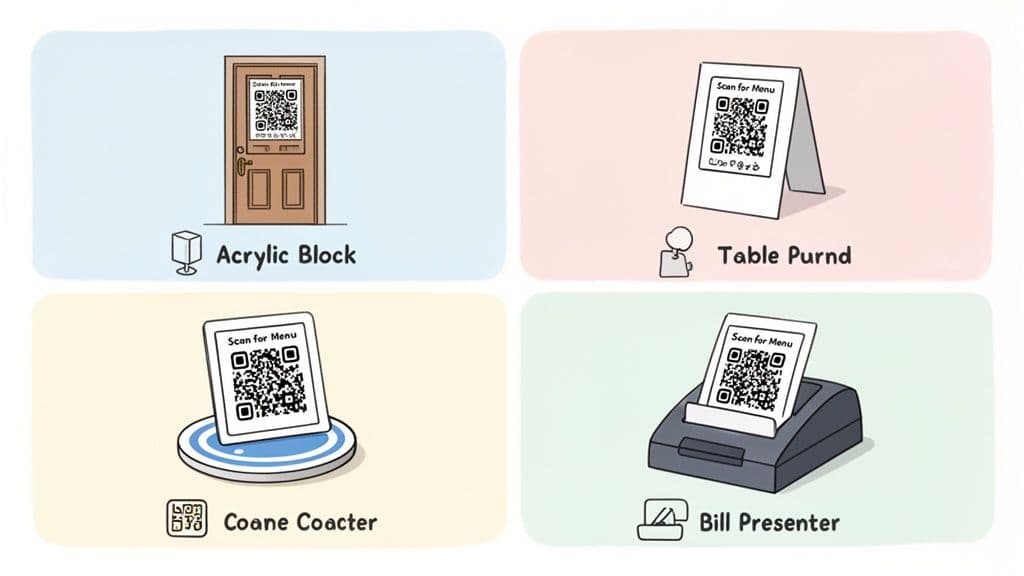
Getting this right boils down to two things: nailing the print specifications and being smart about placement. Get both right, and your qr code for restaurant menu will be a seamless, professional, and helpful part of the dining experience.
Getting the Print Right Every Time
Before you place a single code, you have to print it correctly. A blurry, pixelated, or tiny QR code is a one-way ticket to frustrated customers and scan errors.
Always, and this is non-negotiable, download your QR code in a vector file format. That means SVG or EPS. Unlike pixel-based files like PNG or JPG, vectors can be scaled to any size—from a tiny coaster to a huge window decal—without losing quality. This guarantees a sharp, crisp code that phone cameras can read instantly.
Best Practice: As a rule of thumb, never print a QR code smaller than 1 x 1 inch (2.5 x 2.5 cm). Any smaller and you’ll find some phone cameras struggle to focus, especially in the low-light ambiance of many restaurants.
Also, consider the material's finish. A glossy surface can create terrible glare from overhead lights, making the code impossible to scan. A matte finish is almost always the safer bet for reliable scanning in any lighting condition.
Strategic Placement Beyond the Table Tent
The classic table tent is a good start, but it’s just the beginning. Think through the entire customer journey, from the moment they walk in the door to when they pay the bill. Every touchpoint is an opportunity to make the menu easily accessible.
Here are a few high-impact placement ideas from real-world restaurants:
- On the Host Stand or Front Door: This is perfect for guests waiting for a table. They can browse the menu and decide what they want before they even sit down, which can significantly speed up your table turn time.
- On Coasters: It’s a clever and subtle way to keep the menu at their fingertips throughout the meal. This is a game-changer for guests who want to order another round of drinks or a dessert later on.
- Inside the Bill Presenter: Tucking a small, well-designed QR code sticker inside the check folder is a great last-minute prompt for dessert or a final coffee.
- As Window or Wall Decals: For fast-casual spots or cafes, a larger decal near the ordering counter or on the front window makes the menu visible to passersby and anyone waiting in line.
The goal is to place the menu wherever a customer might think of wanting it, removing any friction from the process.
Choosing Materials That Match Your Brand
How you display your QR code says a lot about your brand. A flimsy piece of paper taped to the table feels like a sloppy afterthought. Instead, invest in materials that are not only durable but also complement your restaurant’s decor.
Here are a few options that blend function with style:
| Material Type | Best For | Why It Works |
|---|---|---|
| Acrylic Blocks | Upscale, modern, or fine-dining establishments. | Gives off a sleek, polished look that feels premium. It's also durable and easy to wipe down. |
| Engraved Wood | Rustic, farm-to-table, or craft-focused restaurants. | Adds a warm, natural element to the table that fits with a cozy, organic aesthetic. |
| Metal Stands | Industrial, minimalist, or contemporary bistros. | Provides a sturdy, clean look. Finishes like brushed steel or matte black are popular and resilient. |
| Branded Stickers | High-traffic bars, cafes, or for use on coasters and bill presenters. | A cost-effective and versatile option for adding a QR code to almost any surface. |
When you choose your materials carefully, the qr code for restaurant menu stops being just a utility. It becomes an integrated part of your table setting and the overall brand experience, reinforcing the attention to detail you put into everything you do.
Using Scan Data to Sharpen Your Menu and Service
This is where your dynamic QR code for restaurant menu evolves from a simple link into a powerful business intelligence tool. A paper menu is a dead end—it tells you nothing about customer behavior. But the scan data from your QR code? That’s a direct window into how your customers actually interact with your menu.
Platforms like QR Code Maker have built-in analytics that turn raw scan numbers into actionable insights. It’s time to stop guessing and start making data-driven decisions about everything from staffing to specials.
What to Look For in Your Analytics
When you first open your analytics dashboard, you'll see a variety of numbers and graphs. Don't get overwhelmed. Each metric tells a story about what’s happening on your floor.
Here’s what you should be watching:
- Total Scans: The big-picture number. This shows how many times your menu was viewed over a day, week, or month. It's your baseline for tracking trends.
- Unique Scans: This tracks how many individual devices scanned your code. If your total scans are much higher than your unique scans, it could mean people are pulling up the menu multiple times during their visit—perhaps to order another drink or check out dessert options.
- Scans by Time of Day: This is where it gets really useful. A simple bar chart showing scan activity by the hour often reveals your true peak dining times, which can be surprisingly different from what your reservation book says.
- Scans by Location: If you run multiple locations or use different QR codes for the patio versus the main dining room, you can see which areas are getting the most traffic.
Paying attention to these core metrics will help you spot patterns you never knew existed. For a deeper look into the nuts and bolts, check out our guide on how to track QR code scans.
Turning Numbers into Action
Data is just noise until you use it to make better decisions. The real magic happens when you translate these numbers into tangible improvements for your restaurant.
For example, let's say your scan data shows a massive, consistent spike every Friday between 6 PM and 8 PM. That’s your signal. You can now confidently schedule an extra server or bartender for that specific two-hour window to handle the rush. It’s no longer a hunch; it’s a decision backed by hard evidence of customer behavior.
Key Takeaway: Your scan data is a direct reflection of customer demand. Use it to align your staffing, promotions, and menu engineering with what your guests are actually doing, not what you assume they're doing.
This kind of data-driven thinking has become essential for restaurants. During the initial shift to digital, QR code usage shot up dramatically. Today, a significant percentage of restaurants use QR codes for their menus, which has been shown to boost customer engagement. This wasn't just a temporary fix; it was a fundamental shift in how the industry operates more efficiently.
Fine-Tuning Your Menu and Promotions
Your scan data can do more than just help with scheduling—it’s a powerful tool for menu strategy. While the analytics alone won't tell you which specific items people ordered, you can get clever. For instance, you could create a separate QR code that links directly to your "Cocktail Specials" and another for the "Main Menu." By comparing the scan counts, you get a solid idea of how much interest your promotions are generating.
But guest engagement is only half the battle. To truly optimize your menu, pair that behavioral data with financial insights. Using a good food cost percentage calculator helps you nail down your pricing and ensure every dish is profitable. When you combine what you know about customer interest (from scans) with what you know about profitability, you have a powerful formula for building a menu that's both popular and profitable.
Common Questions About Restaurant QR Code Menus
Switching to a digital menu often brings up a few questions. Even with all the benefits, restaurant owners have practical concerns about how a qr code for restaurant menu will work with their regulars, their staff, and their daily operations. Let’s tackle the most common questions head-on so you can roll out your QR codes with confidence.
What If My Customers Aren't Tech-Savvy?
This is perhaps the most common—and most valid—concern. Hospitality always comes first. And while the vast majority of diners are now comfortable with QR codes, you never want to make a single guest feel left out or frustrated.
The solution is simple: be prepared.
Put a clear, friendly instruction right below the code. Something as straightforward as "Point your phone's camera here for our menu" makes a world of difference. More importantly, always have a backup plan. Keep a few sanitized, laminated physical menus on hand for anyone who prefers one. Another great option is a dedicated restaurant tablet with the menu pre-loaded.
The goal is hospitality, not forcing technology. A QR code is a tool for efficiency, but it should never get in the way of making every guest feel welcome, no matter how they prefer to view the menu.
How Do I Update My Menu with a QR Code?
This is where the magic of a dynamic QR code really shines. If you’re using one, you’ll never have to reprint a single thing to change your menu. The process is incredibly simple and takes just a few seconds.
All you do is log into your QR code generator’s dashboard, like the one from QR Code Maker. From there, you just swap out the destination URL your code points to. Whether you're marking an item as sold out, tweaking happy hour prices, or launching an entirely new seasonal menu, the change is instant. The physical QR code on your tables stays the same, but it now sends customers to your fresh, updated menu.
Is It Better to Link to a PDF or a Web Page?
For almost every restaurant, a mobile-friendly web page is the clear winner. Linking to a PDF of your print menu might feel like a quick fix, but it usually creates a clunky and frustrating experience for your guests. Nobody enjoys pinching and zooming to read tiny text on a phone screen.
A dedicated mobile menu page gives you serious advantages:
- Faster Loading: Web pages are lightweight and pop up almost instantly. A bulky PDF can test a hungry customer's patience.
- Effortless Navigation: They’re built for vertical scrolling and have clickable categories, letting guests jump to "Appetizers" or "Drinks" with a single tap.
- Richer Content: You can easily add mouth-watering photos, detailed descriptions, and allergy info without making the layout feel cluttered.
Can I Make My QR Code Match My Restaurant's Brand?
Absolutely—and you definitely should. A generic black-and-white QR code can feel impersonal and out of place on a carefully set table. Customizing your code makes it feel like a deliberate, professional part of your dining experience instead of a last-minute add-on.
Use a platform that gives you branding options. You’ll want the ability to:
- Add your logo right in the center of the code.
- Change the colors to match your restaurant's brand palette.
- Use a frame with a clear call-to-action like "Scan for Menu."
These small touches build trust, get more people to scan, and reinforce your brand's commitment to quality down to the last detail.
Ready to create a professional, branded, and trackable qr code for restaurant menu that your customers will love? With QR Code Maker, you can design and launch your dynamic menu QR code in minutes. Start for free at qr-code-maker.app.
Ready to create your QR code?
Free forever for static codes. Pro features with 14-day trial, no credit card required.
Irina
·Content LeadIrina leads content strategy at QR Code Maker, helping businesses understand how to leverage QR codes for marketing, operations, and customer engagement. Her expertise spans digital marketing, user experience, and practical implementation guides.
Learn more about us →Related Articles
A Practical Guide to Creating a Restaurant Menu QR Code
Create a branded, dynamic restaurant menu QR code that enhances the dining experience, boosts efficiency, and provides valuable guest insights. Learn how.
How to Create a WiFi Password QR Code for Your Business
Learn how to create a secure WiFi password QR code. This guide covers branding, tracking, and best practices for guest WiFi access in any business setting.
How to Use a QR Code in Email to Boost Engagement
Discover a proven approach to qr code in email that boosts opens, CTR, and ROI with actionable tips.