Restoran Menüsü QR Kodları
Restoranınız için kategoriler, fiyatlar, fotoğraflar ve diyet etiketleriyle QR kod menüsü oluşturun. Yemekleri anında güncelleyin, yeniden baskı maliyeti yok.
Restoran Menüsü QR kodları, bizimle oluşturduğunuz ve barındırdığınız dijital bir menüye bağlantı verir. Fiyatları güncelleyin, mevsimlik ürünler ekleyin veya bir şeyi kaldırın—değişiklikler anında yayına girer, yeniden baskı gerekmez.
Ne İşe Yarar
Misafirler tarar taramaz telefonlarında tam menünüzü görürler—kategorilere göre düzenlenmiş, açıklamalar, fiyatlar ve isteğe bağlı fotoğraflarla. Her akıllı telefonda çalışan, temiz, mobil optimize bir deneyimdir.
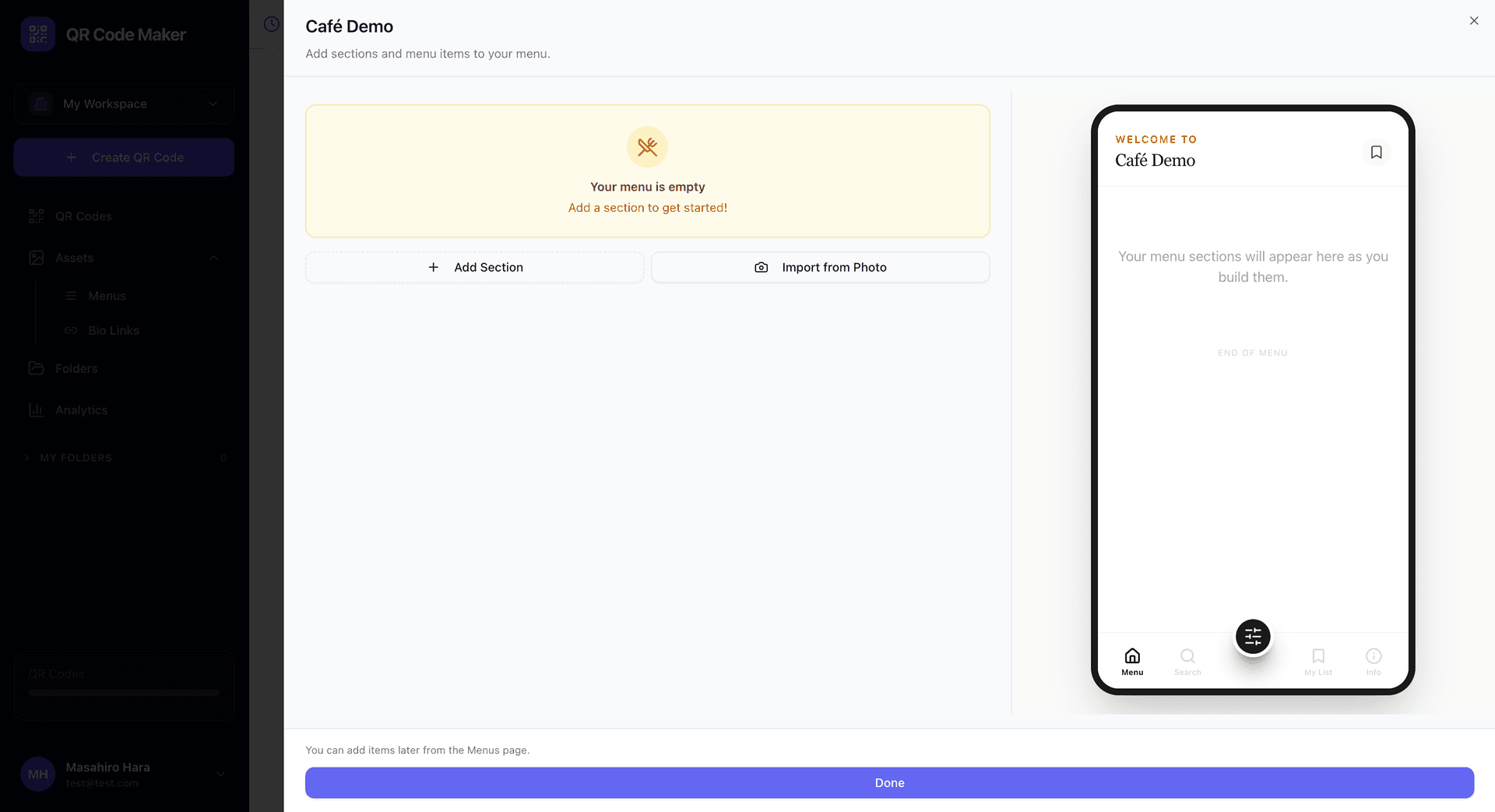
Neler Ekleyebilirsiniz
Menü kategorileri: Başlangıçlar, Ana Yemekler, Tatlılar, İçecekler—restoranınız için anlamlı olacak şekilde düzenleyin.
Menü öğeleri: Her ürün için ad, açıklama ve fiyat. Açıklamaları iştah açıcı ancak özlü tutun.
Ürün görselleri: İsteğe bağlı yemek fotoğrafları. İmza yemekler için harika, ancak her ürün için gerekli değil.
Diyet göstergeleri: Ürünleri vejeteryan, vegan, glutensiz olarak işaretleyin veya özel etiketler ekleyin.
Birden fazla menü: Öğle yemeği, akşam yemeği, içecekler veya mevsimlik özel ürünler için ayrı menüler oluşturun.
Anında Güncellemeler
Fiyatlarınızı değiştirdiniz mi? Somondan kalmadı mı? Panoda menünüzü düzenleyin ve hemen yayına girer. QR kodlarınız aynı kalır.
Menü QR Kodu Oluşturma
Adım 1: Varlıklar → Menüler'e gidin ve menünüzü oluşturun. Kategoriler ekleyin, ardından her kategoriye ürünler ekleyin.
Adım 2: + QR Kodu Oluştur'a tıklayın, Restoran Menüsü'nü seçin ve oluşturduğunuz menüyü seçin.
Adım 3: QR kod tasarımınızı özelleştirin ve indirin.
Önce Menüyü Oluşturun
Menüler, Varlıklar bölümünde bağımsız varlıklardır. Önce menünüzü orada oluşturun ve düzenleyin, ardından ihtiyacınız kadar QR koduna bağlayın.
Menü QR Kodlarının Kullanım Yerleri
Masa kartları: Her masa için bir kart yazdırın. Temizlenecek veya değiştirilecek fiziksel menü yok.
Duvar ekranları: Girişte poster boyutunda bir QR yerleştirin, böylece insanlar beklerken göz atabilir.
Açık hava oturma alanları: Menü QR'nız olan hava koşullarına dayanıklı tabelalar elementlere dayanır.
Paket tezgahları: Müşterilerin alışlarını beklerken göz atmalarını sağlayın.
Vitrin ekranları: Geçenler içeri girmeye karar vermeden önce menünüzü kontrol edebilir.
Misafir Deneyimi
Birisi menü QR'nızı taradığında:
- Menü anında yüklenir—uygulama indirme gerekmez
- Kategoriler kolay dokunulabilir bölümler olarak görünür
- Ürünler ad, açıklama ve fiyat gösterir
- Fotoğraflar (eklediyseniz) temiz bir düzende görüntülenir
- Her şey rahat telefon okuma için boyutlandırılmıştır
Menü Oluşturucu İpuçları
İştah açıcı açıklamalar yazın. "Limon tereyağlı ızgara somon" ifadesi "Somon - ızgara" ifadesinden daha iyidir.
Fiyatları güncel tutun. Menü fiyatlarının ödedikleri ücretle eşleşmemesinden daha sinir bozucu bir şey yoktur.
Mantıklı düzenleyin. Müşterilerin beklediği sırayı izleyin: başlangıçlar, ana yemekler, garnitürler, tatlılar, içecekler.
Fotoğrafları stratejik kullanın. Birkaç harika fotoğraf, birçok vasat fotoğraftan daha iyidir. İmza yemeklerinize odaklanın.
Kendi telefonunuzda test edin. Hızlı yükleniyor mu? Metin okunabilir mi? Gezinme sezgisel mi?
Analitik
Kaç kişinin menünüzü görüntülediğini, hangi kategorilerin en çok ilgi gördüğünü, yoğun görüntüleme saatlerini ve insanların hangi cihazları kullandığını görün. Bu veriler müşteri ilgisini anlamanıza ve menü düzeninizi optimize etmenize yardımcı olur.
Dijital Menü vs Basılı Menü
| Özellik | Dijital Menü QR | Basılı Menü |
|---|---|---|
| Fiyat güncelleme | Anında, ücretsiz | Yeniden baskı maliyeti |
| Ürün ekleme/çıkarma | İstediğiniz zaman | Yeniden baskı gerekli |
| Fotoğraflar | Kolay ekleme | Pahalı baskı |
| Hijyen | Temassız | Temizlik gerekir |
| Maliyet | Aylık abonelik | Baskı başına maliyet |
Sık Sorulan Sorular
Misafirlerin bir uygulamaya ihtiyacı var mı? Hayır. Menü telefonun tarayıcısında açılır, her akıllı telefonda çalışır.
Birden fazla menüm olabilir mi? Evet. Kahvaltı, öğle yemeği, akşam yemeği, içecekler, tatlılar için ayrı menüler oluşturun—ihtiyacınız olan her şey için. Her birinin kendi QR kodu olabilir.
Bir üründen biterse ne olur? Mevcut değil olarak işaretleyin veya geçici olarak kaldırın. Değişiklikler anında gerçekleşir.
Misafirler menüden sipariş verebilir mi? Bu sadece görüntüleme menüsüdür. Sipariş için ayrı bir sipariş sistemiyle entegre edersiniz veya menünüzden ona bağlantı verirsiniz.
Akıllı telefonu olmayan misafirler ne olacak? Tercih eden veya telefonu olmayan misafirler için birkaç basılı menü bulundurun.
Bu planıma dahil mi? Restoran Menüsü QR kodları Starter planları ve üzerinde mevcuttur.