Ses QR Kodları
MP3, WAV veya AAC dosyaları için ses QR kodu oluşturun. Tarayanlar başlık, sanatçı adı ve albüm kapağı içeren oynatıcıda parçanızı dinler. Ücretsiz deneyin.
Ses QR kodları bir ses dosyasına veya streaming sayfasına bağlanır. Müzisyenlerin parçaları paylaşması, tur rehberlerinin ses yorumu sağlaması veya işletmelerin podcast ve ses içeriği paylaşması için mükemmel.
Ne İşe Yarar
Birisi taradığında, ses dosyanızı oynatabilecekleri bir sayfaya götürülür. Oynatıcı sayfasını barındırıyoruz, böylece kendi web sitenizi kurmadan paylaşmayı kolaylaştırıyoruz.
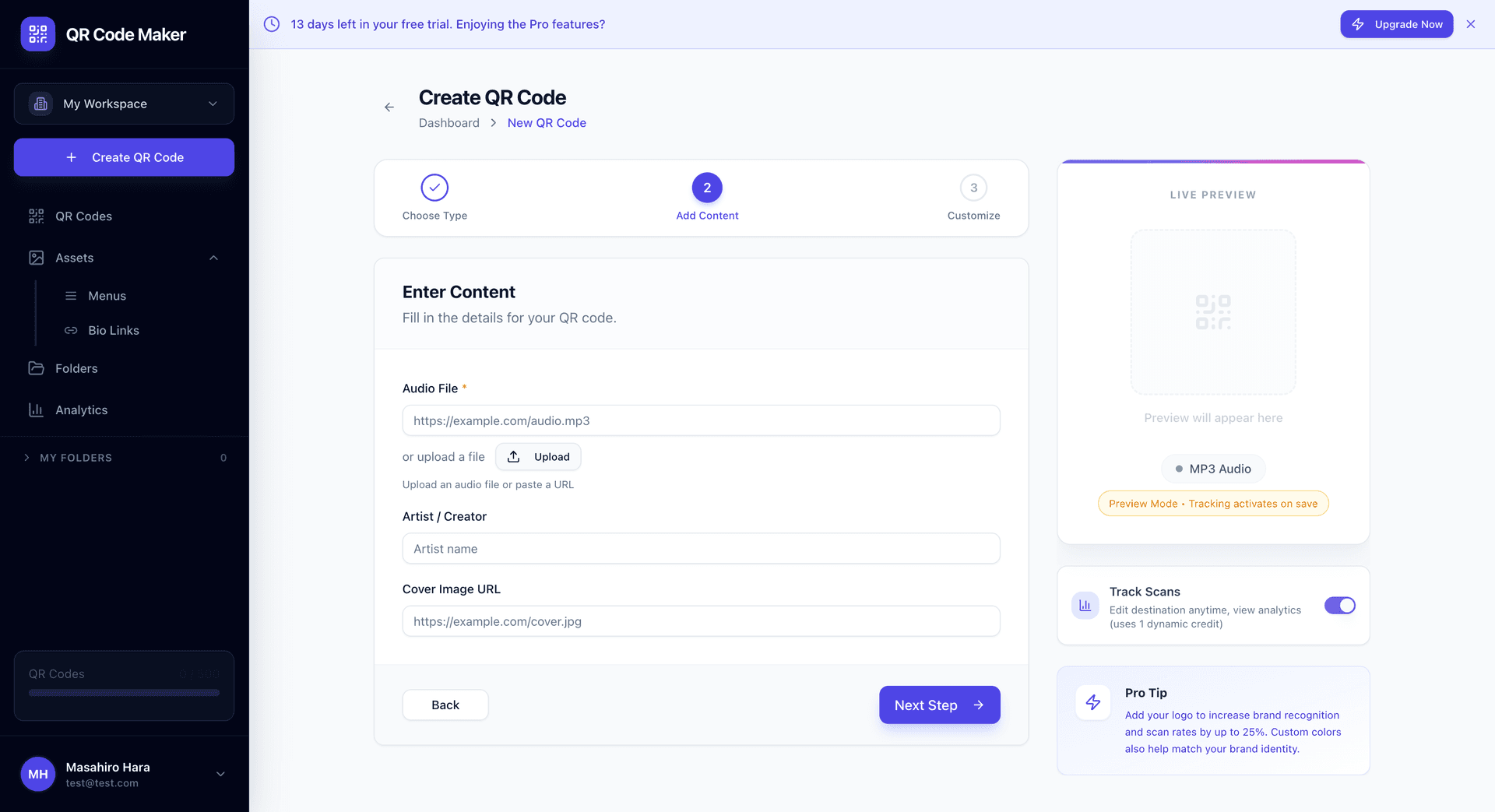
Neler Ekleyebilirsiniz
Ses dosyası: MP3, WAV, OGG veya AAC dosyanızı doğrudan yükleyin.
Parça başlığı: Oynatıcı sayfasında görüntülenen parçanın adı.
Sanatçı adı: Yaratıcıya kredi verin veya işletme adınız.
Albüm kapağı: Oynatıcının yanında görüntülenen isteğe bağlı kapak görseli.
Dosya Boyutu Sınırı
Ses dosyaları 50MB'a kadar olabilir. Tam podcast bölümleri gibi daha uzun içerikler için başka yerde barındırmayı ve ona bağlanmak için bir Website QR kullanmayı düşünün.
Ses QR Kodu Oluşturma
Adım 1: + QR Kodu Oluştur'a tıklayın ve MP3 Ses'i seçin.
Adım 2: Ses dosyanızı yükleyin veya mevcut bir ses dosyasına URL yapıştırın.
Adım 3: Parça başlığı, sanatçı adı ve albüm kapağı ekleyin (isteğe bağlı ancak önerilir).
Adım 4: QR kod tasarımınızı özelleştirin ve indirin.
Kullanım Durumları
Müzisyenler: Single'ları, demo parçaları veya örnek klipleri paylaşın. Posterler, kartvizitler veya CD ambalajına yazdırın.
Sesli turlar: Müzeler, galeriler, tarihi yerler, yürüyüş turları. Her konum kendi sesli QR'ını alır.
Podcaster'lar: Belirli bölümleri paylaşın. Tanıtım materyallerine yazdırın.
Eğitim: Ders kayıtları, dil dersleri, telaffuz rehberleri.
Gayrimenkul: Açık evler için sesli mülk açıklamaları.
Restoranlar: İmza yemekler hakkında şef yorumu.
Yazar okumaları: Sesli kitap örnekleri, yazarın alıntıları okuması.
Oynatıcı Deneyimi
Ziyaretçiler taradığında şunları görürler:
- Albüm kapağı (eklediyseniz)
- Parça başlığı ve sanatçı
- Oynat/duraklat kontrolleri
- Atlama için ilerleme çubuğu
- Ses kontrolü
Sayfa mobil optimize edilmiştir ve herhangi bir akıllı telefon tarayıcısında çalışır—uygulama gerekmez.
Dinamik QR Kodu
Ses QR kodları dinamiktir, bu şu anlama gelir:
- QR kodunu yeniden basmadan istediğiniz zaman ses dosyasını güncelleyin
- Etkileşim analitiklerini görmek için taramaları izleyin
- Güncellenmiş bir versiyon yayınlarsanız içeriği değiştirin
- Gerektiğinde metadata'yı değiştirin (başlık, sanatçı, kapak)
Bu dinamik bir QR kodudur, bu nedenle dinamik QR kodu kredilerinizden birini kullanır.
Desteklenen Formatlar
| Format | Uzantı | Notlar |
|---|---|---|
| MP3 | .mp3 | En uyumlu, önerilir |
| WAV | .wav | Daha büyük dosyalar, kayıpsız kalite |
| OGG | .ogg | Açık format, iyi sıkıştırma |
| AAC | .aac, .m4a | Apple formatı, iyi kalite |
En iyi uyumluluk için tüm cihazlarda MP3 önerilir.
İpuçları
Dosyaları makul tutun. 320kbps'de 3 dakikalık bir şarkı yaklaşık 7MB'dır—bu iyidir. Yüksek bit hızında 2 saatlik bir podcast sınırlara ulaşabilir.
Albüm kapağı ekleyin. Bir görsel oynatıcı sayfasını daha ilgi çekici ve profesyonel yapar.
Farklı telefonlarda test edin. Sesin hem iPhone hem de Android'de sorunsuz çaldığından emin olun.
Ses kalitesi vs. dosya boyutunu düşünün. Ses için 128kbps iyidir; müzik için 256-320kbps.
Ses QR vs Diğer Seçenekler
| İhtiyaç | En İyi Seçenek |
|---|---|
| Spotify/Apple Music paylaş | Streaming bağlantısıyla Website QR |
| SoundCloud parçası paylaş | Website QR |
| Kendi barındırılan ses dosyası | Ses QR |
| Apple/Spotify'da podcast bölümü | Website QR |
| Streaming hizmetlerinde olmayan ses | Ses QR |
Ses dosyasının kendisine sahip olduğunuzda Ses QR kullanın. İçeriğiniz streaming platformlarında zaten barındırılıyorsa Website QR kullanın.
Sık Sorulan Sorular
Dinleyiciler dosyayı indirebilir mi? Şu anda oynatıcı sadece streaming'dir. İndirilebilir dosyalar için başka yerde barındırın ve bir Website QR kullanın.
Maksimum dosya boyutu nedir? Dosya başına 50MB. Daha büyük dosyalar için sıkıştırmayı veya özel bir platformda barındırmayı düşünün.
Sesi şifre ile koruyabilir miyim? Şu anda değil. Gizlilik gerekiyorsa, erişim kontrolleri olan bir platformda barındırmayı düşünün.
Dosya ne kadar süre saklanır? Hesabınız aktif olduğu ve QR kodu var olduğu sürece.
Birden fazla parça yükleyebilir miyim? Her Ses QR bir dosyaya bağlanır. Birden fazla parça için ayrı QR kodları oluşturun veya her birine bağlantılarla bir Bio Link kullanın.
Video'yu destekliyor musunuz? Video içeriği için Video QR kodlarına bakın.